library(slendr)
init_env()

pop <- population("pop", time = 1, N = 5000)

model <- compile_model(
  populations = pop,
  generation_time = 1,
  simulation_length = 1000
)

plot_model(model)

ts <- msprime(model, sequence_length = 10e6, recombination_rate = 1e-8)

samples <- ts_names(ts)Computing statistics
Computing population genetic statistics requires a specification of what should be computed and how. Which individuals should a computation be performed on? If multiple individuals should be grouped together, how do we define these groups?
This chapter will teach you how to do this with slendr by guiding you through exercises focused on the most fundamental concepts of population genomics. The focus will be less on teach you how these concepts work (you might be already be quite familiar with) and more to give you the opportunity to learn the technicalities of R and slendr in a familiar context.
That said, the exercises have designed to provide interesting puzzles to showcase the usefulness of simulation-based exploration even in (seemingly) basic scenarios and applications, so that even readers relatively well familiar with population genomics will appreciate a new perspective on familiar topics.
Preparation
Let’s start with the following single-population model to keep things as simple as possible. Look through the code to understand what it does, then save it as slendr_statistics_single.R. Run the entire script and inspect the produced visualization to make sure your understanding is correct.
Exercise: Adding mutations
When you typed ts in your R console earlier, you may have noticed a strange thing — although msprime() simulated genomic data, there are no mutations! How can this be?
As we will see later, the magic of tree sequences allows us to compute any population genetic statistic without mutations. That said, particularly for exploring statistics computed by various third-party software outside of R (and for comparing simulations to these software methods), having mutations is often useful. Here’s how we can make that happen.
Modify the part of your script slendr_statistics_single.R by “piping” the output of the msprime() function to ts_mutate(mutation_rate = 1e-8) (remember the %>% “pipe operator” introduced in the earlier chapters). After you execute this new command and type ts in the R console to inspect the summary, you should see that mutations have been added.
Even though mutations are generally not needed, there’s almost never any huge downside to adding them, so I recommend you always use both msprime() and ts_mutate() in your models.
Exercise: Within-group(s) statistics — nucleotide diversity
The simplest possible computation we can do is to compute a statistic from a single population. As an example, let’s look at nucleotide diversity \(\pi\), implemented by a slendr function ts_diversity().
If you look at its help page under ?ts_diversity, you will see that it accepts several arguments—for now let’s focus on the first two, ts = (which is obviously a tree-sequence object, such as the one produced by the msprime() engine) and sample_sets =.
When you read the definition of nucleotide diversity, knowing that slendr simulates diploids, how would you interpret the output of ts_diversity() when you compute in on a single simulated individual, such as the indivdual with the name “pop_1”?
Now run the following three commands. They look extremely similar, right? Do they produce the same value? If not, how do you interpret them?
(It turns out that patterns like these are very important for computing any kind of tree-sequence statistic with slendr, so it very much pays off to think about this, even though this looks trivial and nit-picky!)
ts_diversity(ts, sample_sets = c("pop_1", "pop_42"))
ts_diversity(ts, sample_sets = list(c("pop_1", "pop_42")))
ts_diversity(ts, sample_sets = list(pop_subset = c("pop_1", "pop_42")))Of course, you can compute any statistic not only for one group of individuals, but for multiple of them. What result such computation produces depends on whether we’re computing so-called “one-way” statistics (which are computed within groups, like nucleotide diversity here) or “multi-way” statistic (which are computed between groups, like \(F_{ST}\)). For now we’ll stay with one-way statistics.
To make the “one-way” statistic concept clear, let’s practice this. Instead of computing ts_diversity() for a single group of individuals (like “pop_1” and “pop_2” above), compute this using a single ts_diversity() command on multiple subsets of individuals of increasing sizes (let’s say groups of 1, 2, 5, 10, 500 1000, and finally all individuals). Do you expect the same value of nucleotide diversity? And why?
Hint: You can obtain a random subset of a larger set of elements using the built-in R function sample(). Take a look at ?sample manual page if you need more help.
Exercise: Parameter estimation — \(N_e\)
In practical research, we often use different software methods or statistics to estimate some value of interest. In our context—to use a very simple toy example to demonstrate a simulation-based approach in a familiar context—let’s look at a measure of the population size called effective population size, or \(N_e\).
From a bit of background theory of population genetics, we know that we can obtain an estimate of \(N_e\) from nucleotide diversity, which we just computed. Specifically, neutral theory of molecular evolution posits that an idealised diploid population will have a pairwise nucleotide diversity equal to
\[\theta = 4 N_e \mu,\]
where \(\mu\) is the mutation rate. Using simple algebra, this gives us an estimate for \(N_e\) in the form of
\[N_e = \frac{\theta}{4 \mu}.\]
How well does this estimator perform under different scenarios?
If you’re familiar with population genetics, this has all sorts of obvious answers, but let’s demonstrate how we can benchmark this using simulations, hopefully establishing a useful slendr recipe which you will be able to use very often in all kinds of contexts (some of the more complex ones will be demonstrated later in this workshop).
Start by computing a data frame df containing the nucleotide diversity value for every single individual in your tree sequence. Then, use the equation above establishing how to estimate \(N_e\) from nucleotide diversity to add a new column Ne_estimated to this data frame containing the \(N_e\) inferred from this model. Do you get the correct value?
Hint: Remember that you know the true \(N_e\) in your model — it’s the N value in your simulation script! That’s the most powerful thing about simulations — they allow you to establish a ground truth, and benchmark various methods against it!
Of course, benchmarking any method based on a single simulation of a single number doesn’t make sense — so now let’s move things one step forward.
Exercise: Generalizing the simulation
Suppose we need to evaluate how our statistic of interest (here the estimator of \(N_e\)) behaves under different parameters, different, models, different data, etc.
The first instinct of most people would be to just make a copy of the original script, modify it a bunch of times, and re-run the modifications as needed. This works, but is almost always the wrong approach. The correct way to do this is to generalize our code into a self-contained function.
Let’s break this down into individual steps (in software engineering, this process of modifying code and improving it is called “refactoring”).
First, save your script slendr_statistics_single.R into a new file called slendr_statistics_Ne.R. We’ll be working on our improvements in this new file.
Then, program a function called sim_constant, which will accept a single argument Ne_true, and will “wrap around” the following bits of code:
**the slendr demographic model code which compiles the
modelobject,**the command simulating a
tsobject from the givenmodel,the commands creating the
dfdata frame with nucleotide diversity,the inference of
Ne_estimatedfrom nucleotide diversity,adding a column to
dfcalledNe_trueand assigning it theNe_trueargument of your function.
Your function should return this df object as its output.
When you’re done, the code doing 1.-4. above should be gone from your script, entirely replaced by this function.
Hint: If you need help, you can use the following template
To test your function, restart your R session (in RStudio go to Session -> Restart R), then run your entire script. Then, test your function in the R console by running it for different values of \(N_e\) (for instance, type sim_constant(100), sim_constant(1234),sim_constant(20000)`, etc.). Each of your function calls should produce a data frame with the appropriate value of \(\pi\) and the estimated \(N_e\).
Doing all this extra programming work might seem like unnecessary bother. After all, by writing the function, you’ve basically written even more code! But the pay off comes later, as you will see. Custom functions are absolutely critical for efficient, reproducible science. They eliminate copy-pasted bug-prone code and make it much easier to explore ideas, test parameters, and explore various models. In this workshop, you’ll soon see how often I force you to write custom functions—hopefully, by the end you will appreciate why I did this!
Exercise: Benchmarking across parameters
library(ggplot2)
library(purrr)
df_const <- map_dfr(c(1000, 2000, 3000, 4000, 5000, 10000, 15000, 20000), sim_constant)
ggplot(df_const, aes(Ne_true, Ne_estimated)) +
geom_point() +
geom_abline(slope = 1, color = "red", linetype = "dashed") +
ggtitle("True Ne vs Ne estimated from nucleotide diversity (constant model)")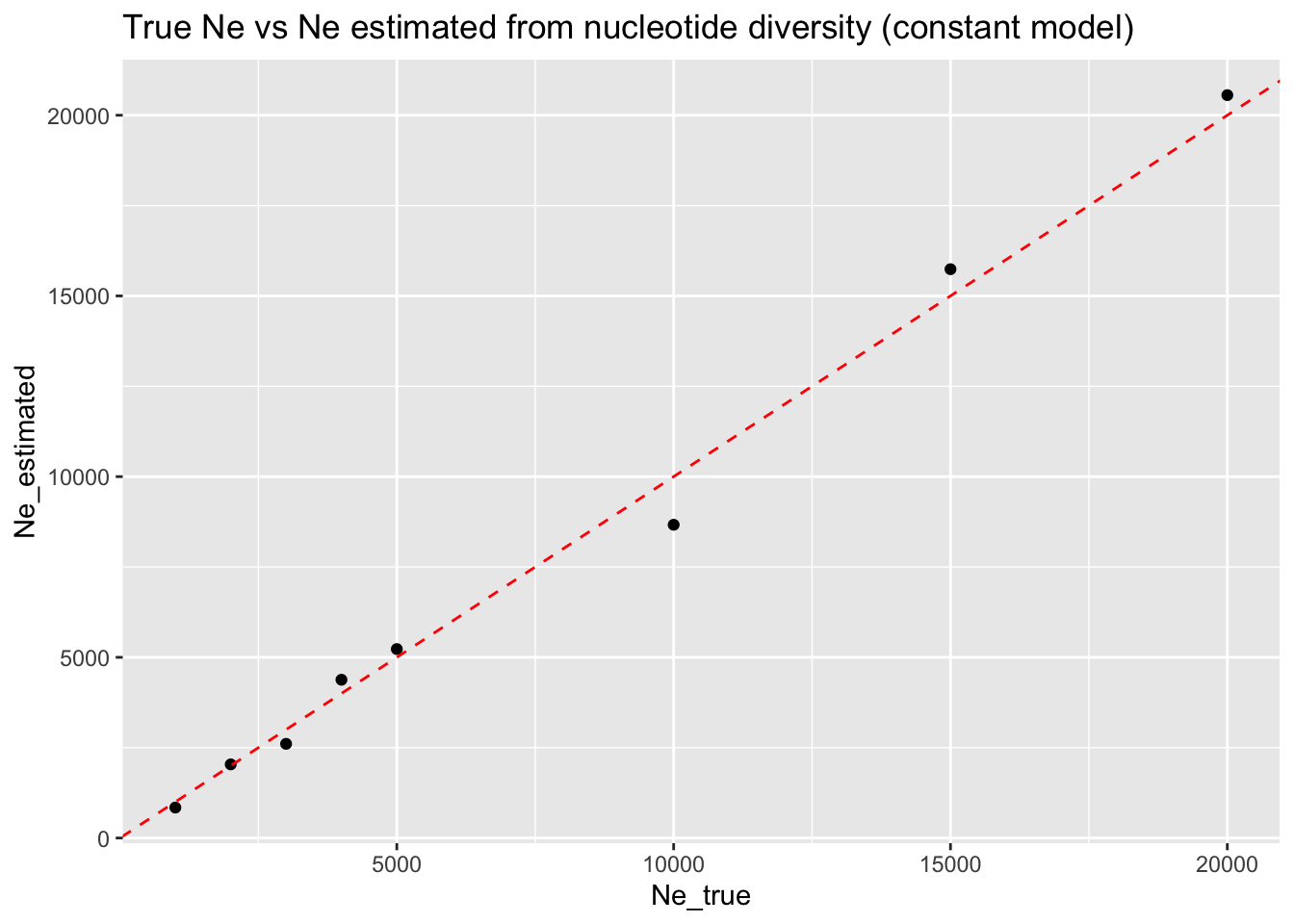
This is probably the best example of how to use these kinds of simulations in practice. Again, nucleotide diverisity-based \(N_e\) estimation and its benchmarking across a range of parameters really is a toy example, but this idea extends to many other settings:
benchmarking of IBD accuracy across different gene-flow scenarios
validating qpAdm inference results for various possible admixture graphs
testing the robustness of local ancestry inference methods (LAI) and admixture dating inference as a function of admixture times and proportions
understanding how PCA differs for different sample sizes from different populations
… and many others. All of these things are something you’ll be able to play with in the freeform sessions at the end, but for now, let’s carry on!
Exercise: Comparing multiple models
Let’s suppose we want to see how robust our statistic of interest (in this toy example, nucleotide divertisity, \(\pi\)) is to a choice of the underlying demographic model. In the previous exercise, we worked with using \(\pi\) to estimate the effective population size of a population under study (\(N_e\)) and verified that it works very well for a model of a long-term constant population size.
How about when we introduce a bottleneck into our model? How well does our \(N_e\) estimate work in such case?
Build a new model of a single population “pop”, again starting with \(N_e\) of 5000, then introduce a bottleneck using the function resize() which will set the size of the population to the given value Ne at time 800. You can again start by writing a couple of lines of code implementing such model, perhaps setting the bottleneck to \(N_e\) of 500, and once you have it, wrap it around in a function simulate_bottle(Ne), just like you did in the previous exercise.
pop <- population("pop", time = 1, N = 5000) %>% resize(N = 500, time = 500)
model <- compile_model(
populations = pop,
generation_time = 1, simulation_length = 1000
)
plot_model(model, proportions = TRUE)simulate_bottle <- function(Ne) {
pop <- population("pop", time = 1, N = 5000) %>% resize(N = Ne, time = 500)
model <- compile_model(
populations = pop,
generation_time = 1, simulation_length = 1000
)
df <- compute_pi(model)
# add annotation for downstream analyses
df$Ne_true <- Ne
df
}We can see that even a drastic population bottleneck such as the one we programmed does not actually reduce the observed levels of nucleotide diversity that much! As a result, our \(N_e\) estimate is very wrong—we consistently estimate it at the level of 5000 (i.e., the size prior to the bottleneck), regardless of the true size of the population after the bottleneck.
What this means that estimating \(N_e\) from nucleotide diversity (which is very often done in population genetics) only works reliably in a population which has reached a long-term stable effective size.
We will see about a more robust method to do this in a later exercise.
library(ggplot2)
library(purrr)
df_bottle <- map_dfr(c(1000, 2000, 3000, 4000, 5000, 10000, 15000, 20000), simulate_bottle)
ggplot(df_bottle, aes(Ne_true, Ne_estimated)) +
geom_point() +
geom_hline(yintercept = 5000, color = "red", linetype = "dashed") +
ggtitle("True Ne vs Ne estimated from nucleotide diversity (bottleneck model)") +
ylim(0, 10000)Exercise: Allele frequency spectrum
library(slendr)
init_env()
pop <- population("pop", time = 1, N = 1000)
model <- compile_model(populations = pop, generation_time = 1, simulation_length = 1000)
ts <-
  msprime(model, sequence_length = 10e6, recombination_rate = 1e-8) %>%
  ts_mutate(mutation_rate = 1e-8)
subset <- sample(ts_names(ts), 20)
afs <- ts_afs(ts, sample_sets = list(subset))
plot(afs, type = "l", col = "lightblue", xlab = "allele frequency", ylab = "count")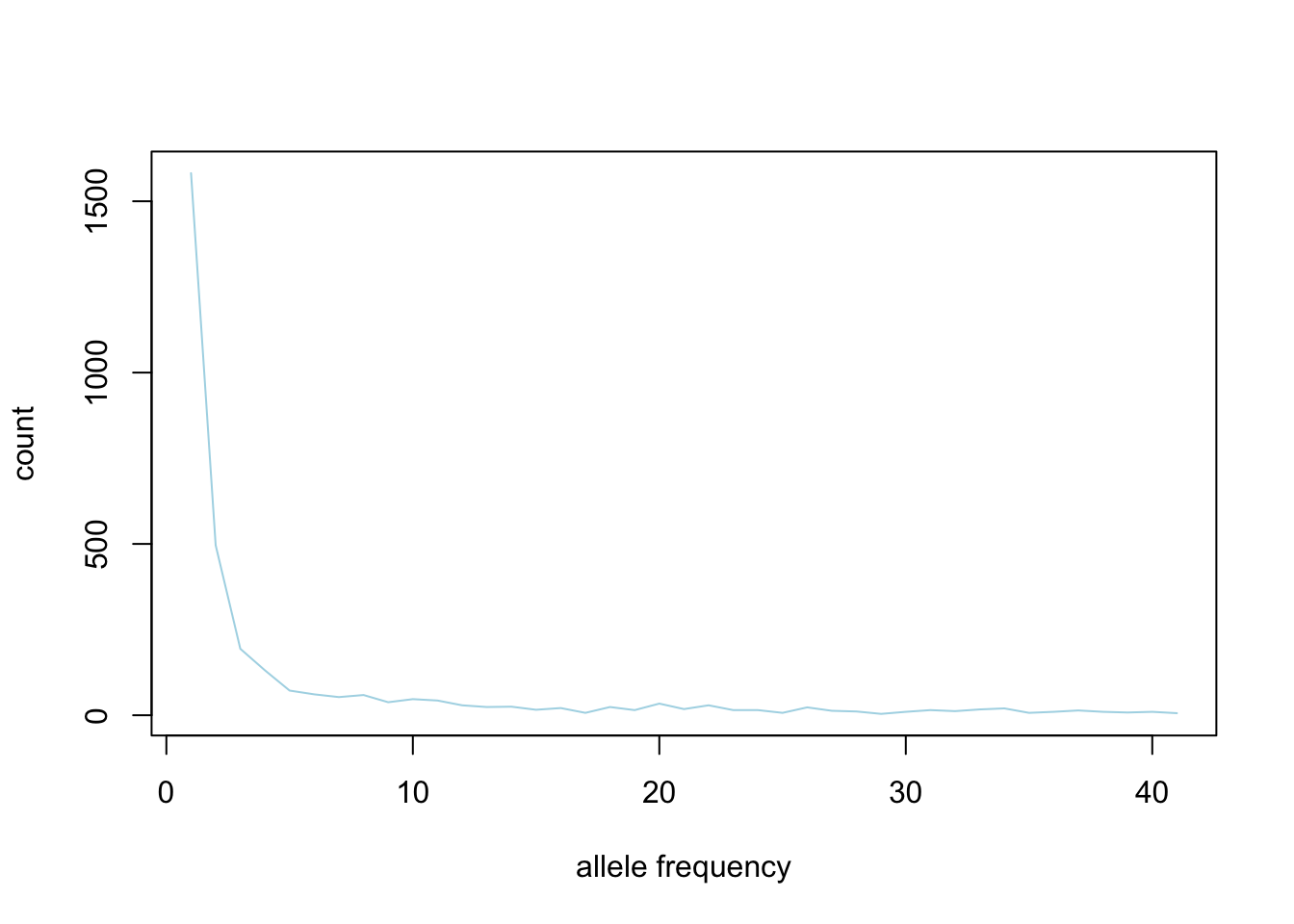
library(slendr)
init_env()

afs_const <- function(Ne) {
  pop <- population("pop", time = 1, N = Ne)
  model <- compile_model(populations = pop, generation_time = 1, simulation_length = 1000)

  ts <-
    msprime(model, sequence_length = 10e6, recombination_rate = 1e-8) %>%
    ts_mutate(mutation_rate = 1e-8)

  subset <- sample(ts_names(ts), 10)

  afs <- ts_afs(ts, sample_sets = list(subset))

  data.frame(
    Ne = Ne,
    bin = 1:length(afs),
    freq = afs
  )
}
afs <- map_dfr(c(1000, 2000, 3000, 4000, 5000, 10000, 15000, 20000), afs_const)
ggplot(afs, aes(bin, freq, color = factor(Ne))) + geom_line()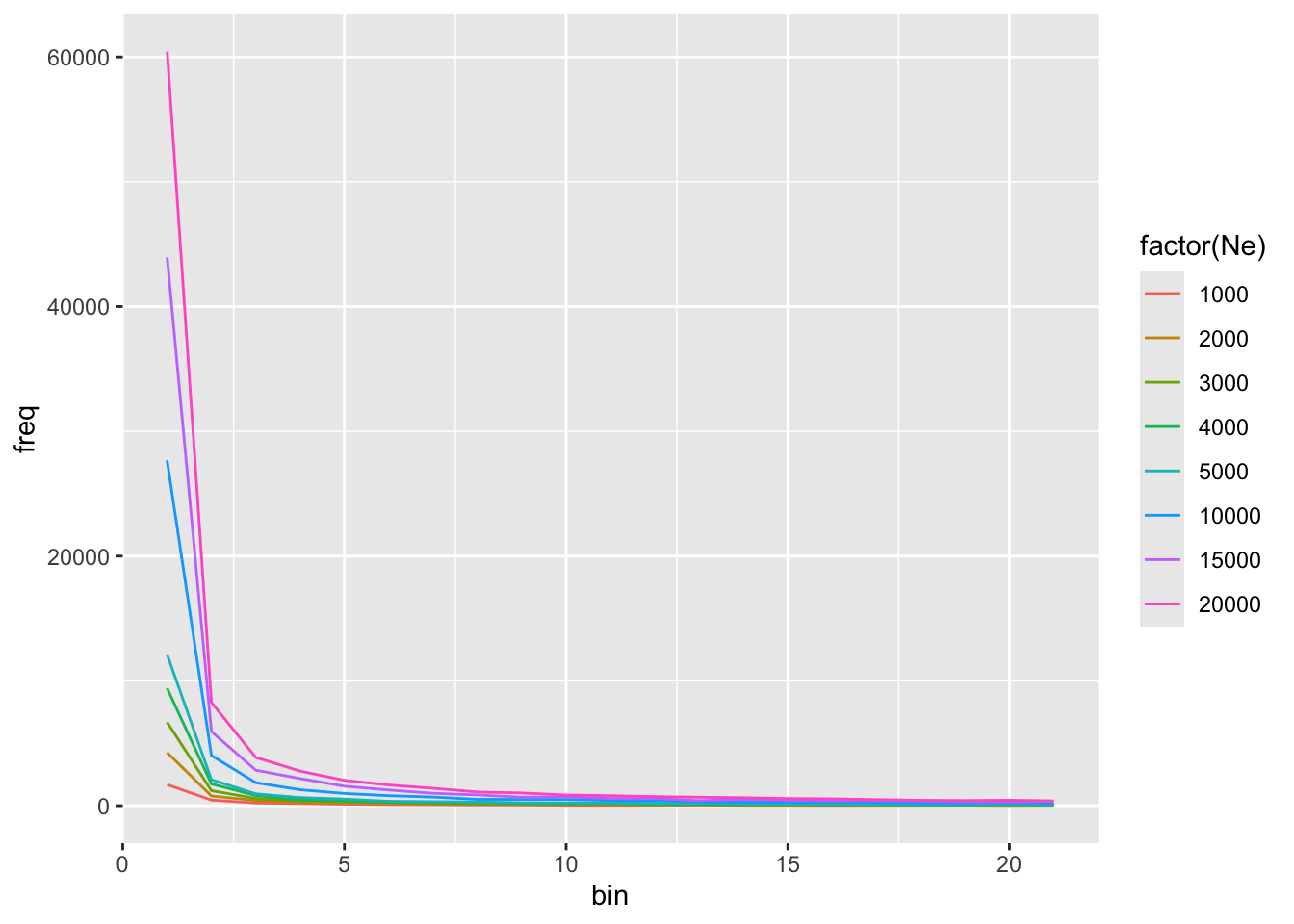
library(slendr)
init_env()

afs_bottle <- function(Ne) {
  pop <- population("pop", time = 1, N = 5000) %>%  resize(N = Ne, time = 500)
  model <- compile_model(populations = pop, generation_time = 1, simulation_length = 1000)

  ts <-
    msprime(model, sequence_length = 10e6, recombination_rate = 1e-8) %>%
    ts_mutate(mutation_rate = 1e-8)

  subset <- sample(ts_names(ts), 10)

  afs <- ts_afs(ts, sample_sets = list(subset))

  data.frame(
    Ne = Ne,
    bin = 1:length(afs),
    freq = afs
  )
}
afs <- map_dfr(c(1000, 2000, 3000, 4000, 5000, 10000, 15000, 20000), afs_bottle)
ggplot(afs, aes(bin, freq, color = factor(Ne))) + geom_line()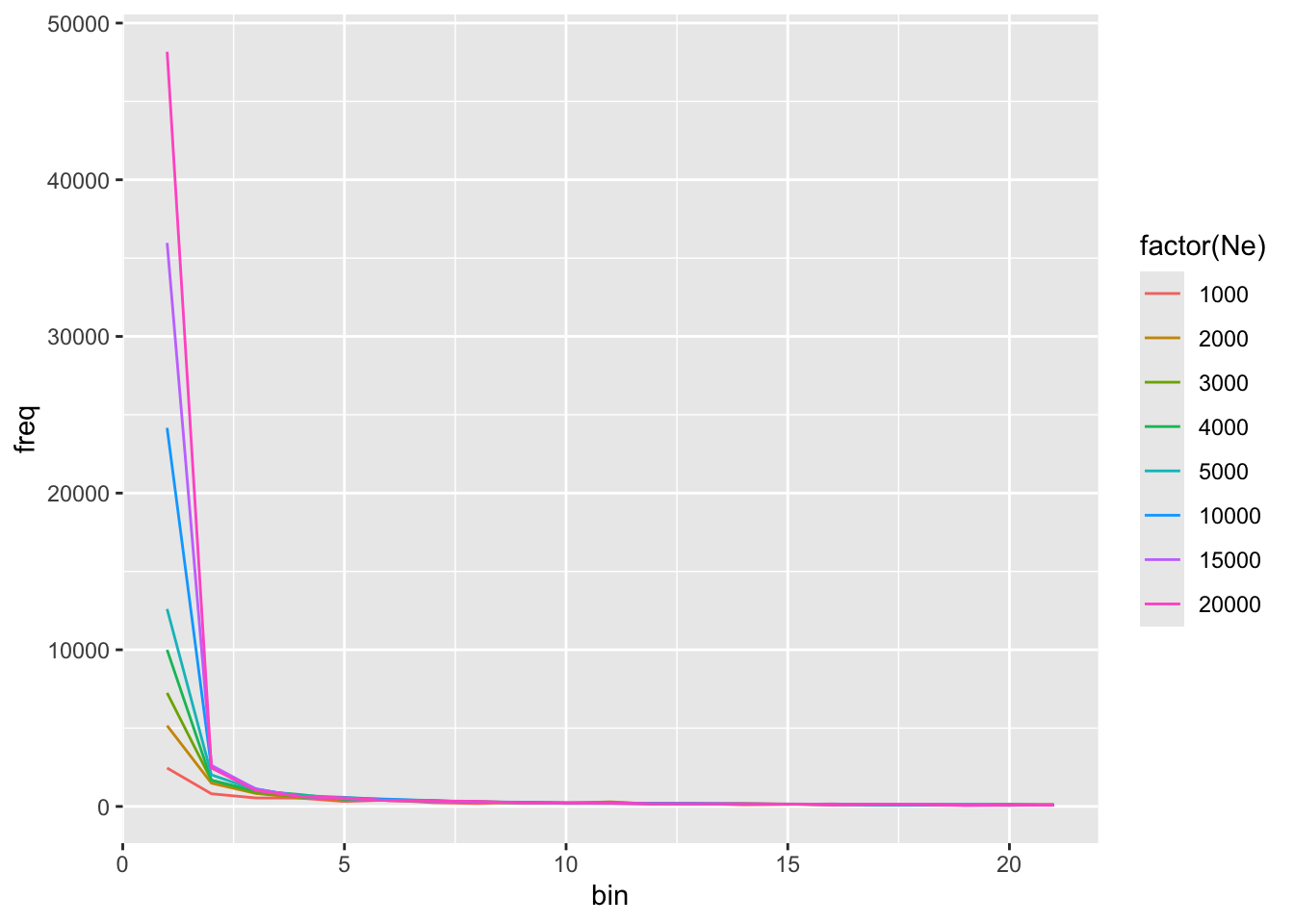
Exercise: Segregating sites and sequencing effort
Motivation: Single model, repeated computation on a subset of tree-sequence samples.
What if you wanted to get a good idea of a genetic diversity in your population, or another summary statistic?
library(dplyr)
library(ggplot2)

library(slendr)
init_env()

pop <- population("pop", time = 1000, N = 1000)
model <- compile_model(pop, generation_time = 1, direction = "backward")
ts <- msprime(model, sequence_length = 20e6, recombination_rate = 1e-8) %>% ts_mutate(1e-8)

ts_segregating(ts, sample_sets = "pop_1")
# A tibble: 1 × 2
set segsites
<chr> <dbl>
1 pop_1 750ts_segregating(ts, sample_sets = c("pop_1", "pop_2"))# A tibble: 2 × 2
set segsites
<chr> <dbl>
1 pop_1 750
2 pop_2 697ts_segregating(ts, sample_sets = c("pop_1", "pop_2", "pop_3"))# A tibble: 3 × 2
set segsites
<chr> <dbl>
1 pop_1 750
2 pop_2 697
3 pop_3 732# oh no, a mistake, we forgot to group this
ts_segregating(ts, sample_sets = list(group = "pop_1"))# A tibble: 1 × 2
set segsites
<chr> <dbl>
1 group 750ts_segregating(ts, sample_sets = list(group = c("pop_1", "pop_2")))# A tibble: 1 × 2
set segsites
<chr> <dbl>
1 group 1300ts_segregating(ts, sample_sets = list(group = c("pop_1", "pop_2", "pop_3")))# A tibble: 1 × 2
set segsites
<chr> <dbl>
1 group 1608paste0("pop_", 1:3)[1] "pop_1" "pop_2" "pop_3"ts_segregating(ts, sample_sets = list(group = paste0("pop_", 1:5)))# A tibble: 1 × 2
set segsites
<chr> <dbl>
1 group 2075subset_segsites <- function(ts, i) {
subset <- sample(ts_names(ts), i)
df <- ts_segregating(ts, sample_sets = list(group = subset))
df$subset_n <- i
df
}
subset_segsites(ts, 5)# A tibble: 1 × 3
set segsites subset_n
<chr> <dbl> <dbl>
1 group 2098 5subset_n <- c(1:25, 50, 750, 100, 250, 500, 750, 1000)
subset_n [1] 1 2 3 4 5 6 7 8 9 10 11 12 13 14 15
[16] 16 17 18 19 20 21 22 23 24 25 50 750 100 250 500
[31] 750 1000df <- map_dfr(subset_n, ~ subset_segsites(ts, .x))
ggplot(df, aes(subset_n, segsites)) + geom_point()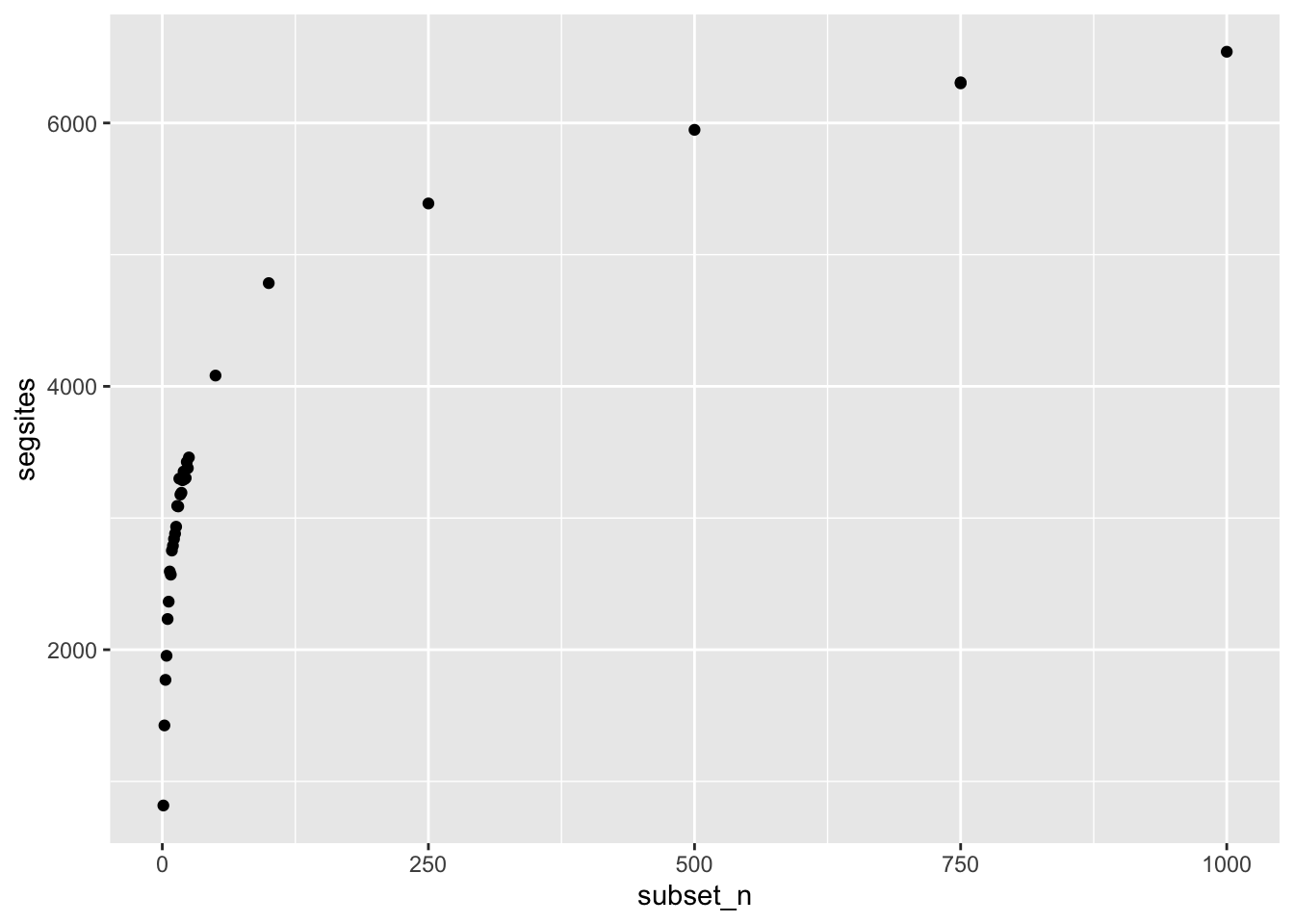
subset_n <- c(1:25, 50, 750, 100, 250, 500, 750, 1000)

subset_diversity <- function(ts, i) {
  subset <- sample(ts_names(ts), i)

  df <- ts_diversity(ts, sample_sets = list(group = subset))
  df$subset_n <- i

  df
}

df <- map_dfr(subset_n, ~ subset_diversity(ts, .x))

ggplot(df, aes(subset_n, diversity)) + geom_point() + scale_x_continuous()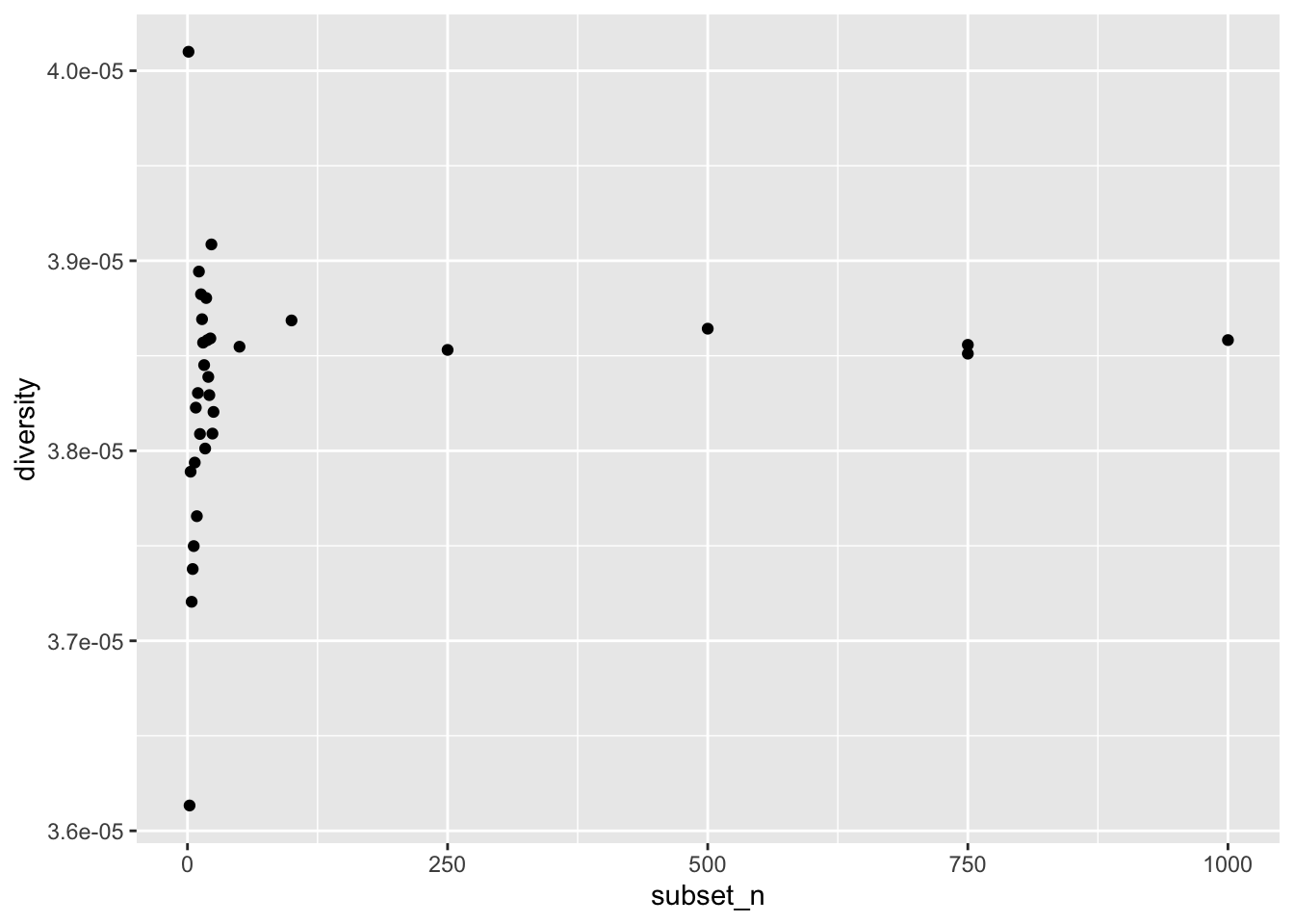
ggplot(df, aes(subset_n, diversity)) + geom_point() + scale_x_log10()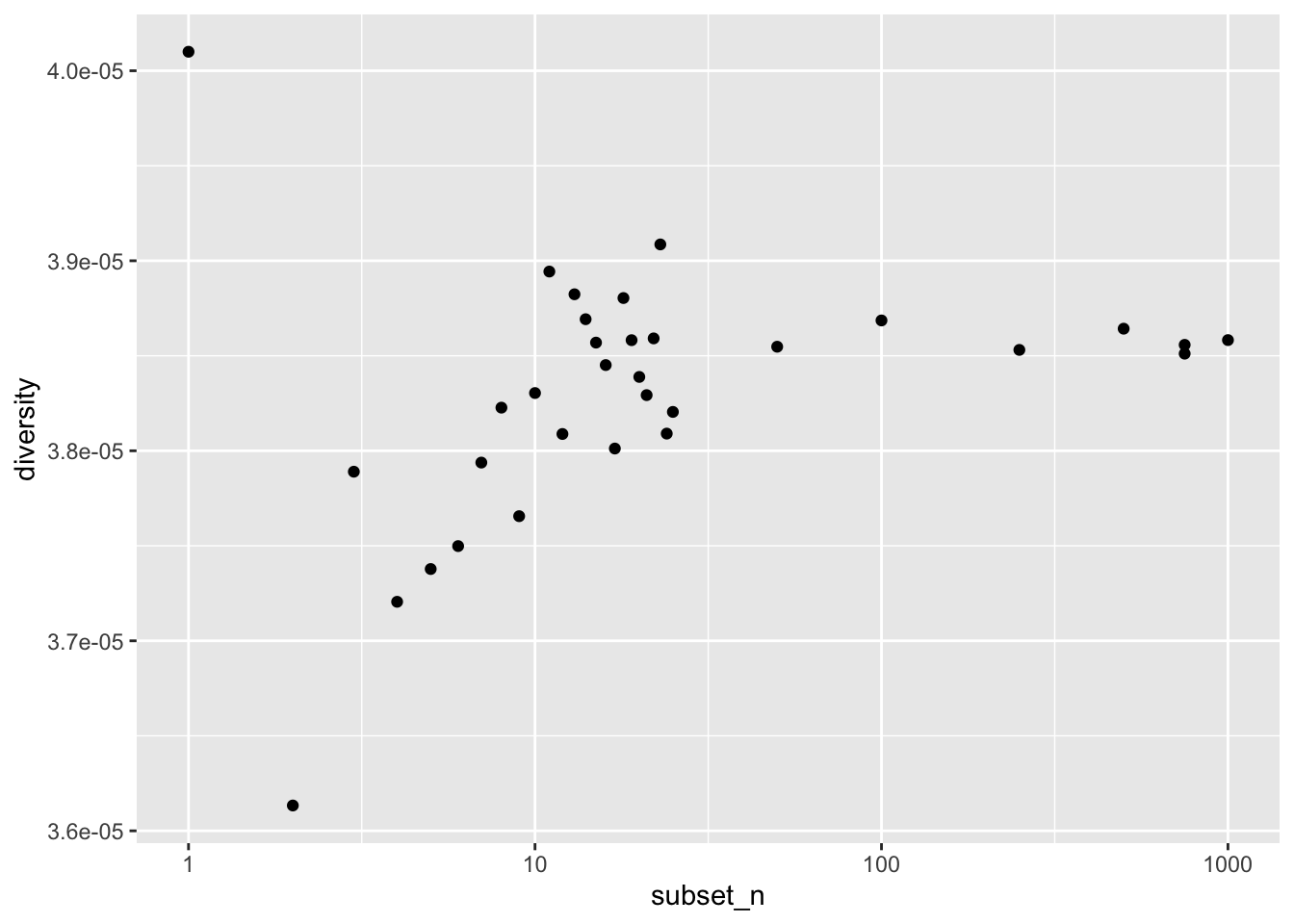
df <- rbind(
  map_dfr(subset_n, ~ subset_diversity(ts, .x)),
  map_dfr(subset_n, ~ subset_diversity(ts, .x)),
  map_dfr(subset_n, ~ subset_diversity(ts, .x)),
  map_dfr(subset_n, ~ subset_diversity(ts, .x)),
  map_dfr(subset_n, ~ subset_diversity(ts, .x))
)

ggplot(df, aes(subset_n, diversity)) + geom_point(alpha = 0.5) + scale_x_continuous()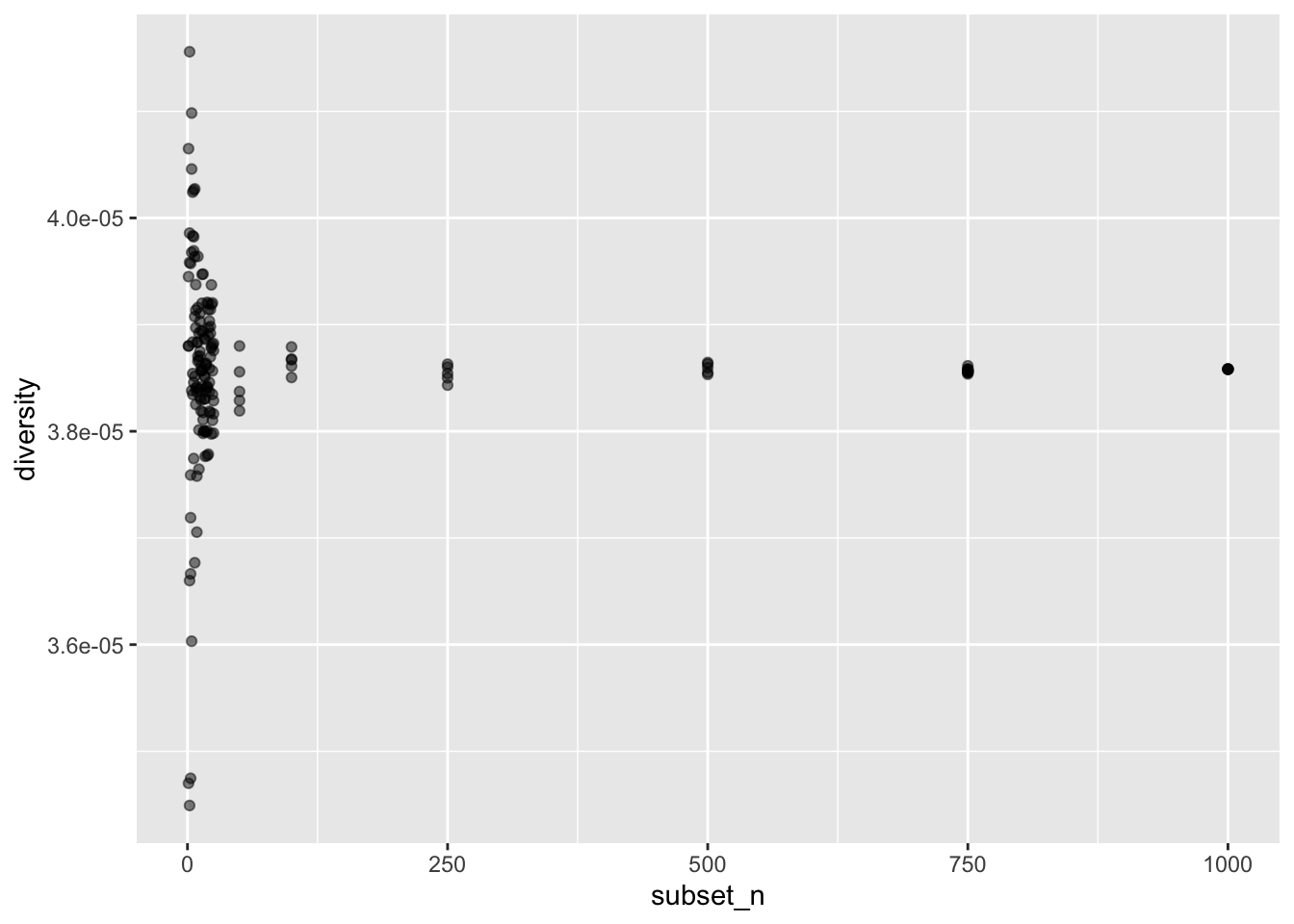
ggplot(df, aes(subset_n, diversity)) + geom_point(alpha = 0.5) + scale_x_log10()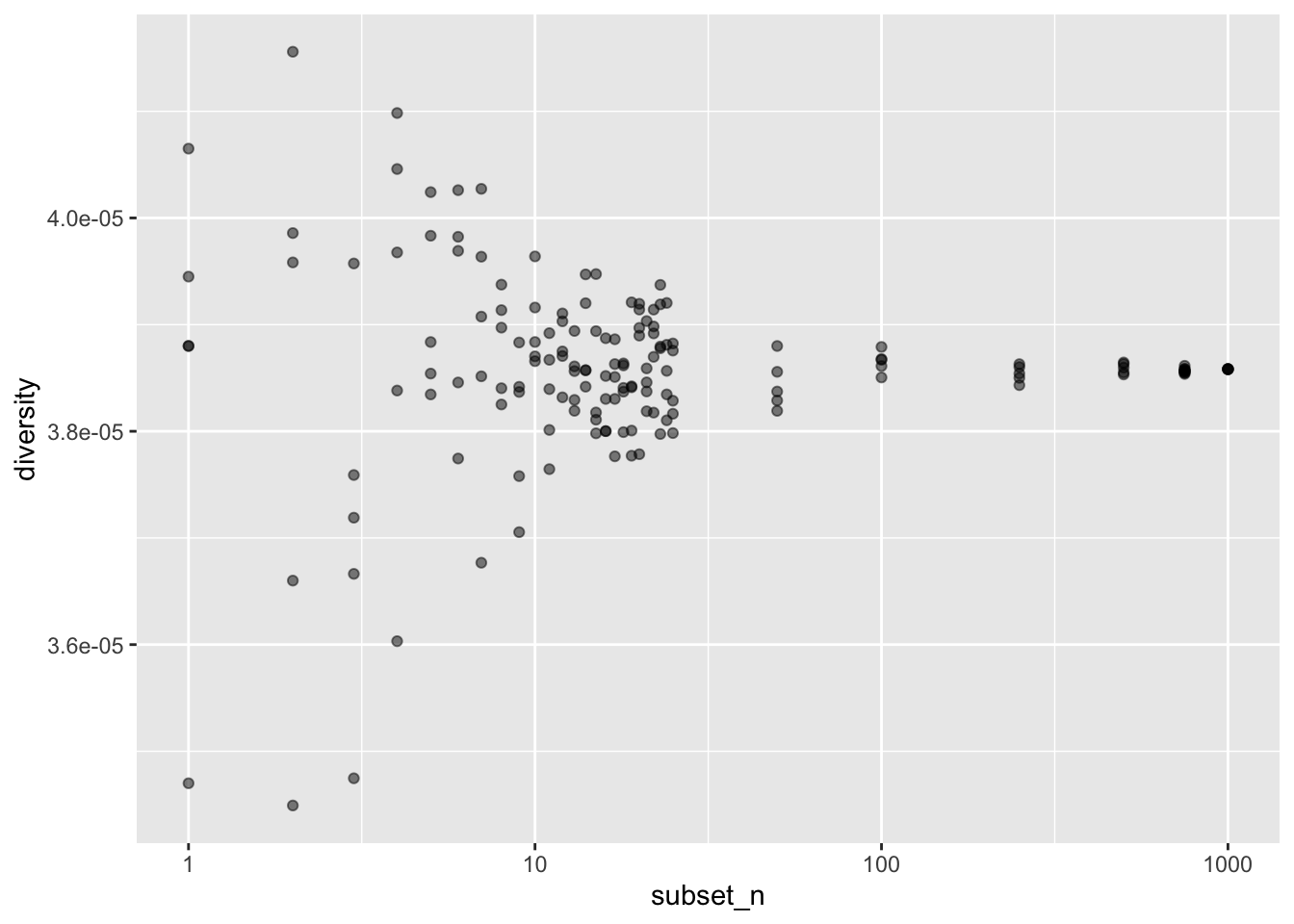
ggplot(df, aes(factor(subset_n), diversity)) + geom_boxplot()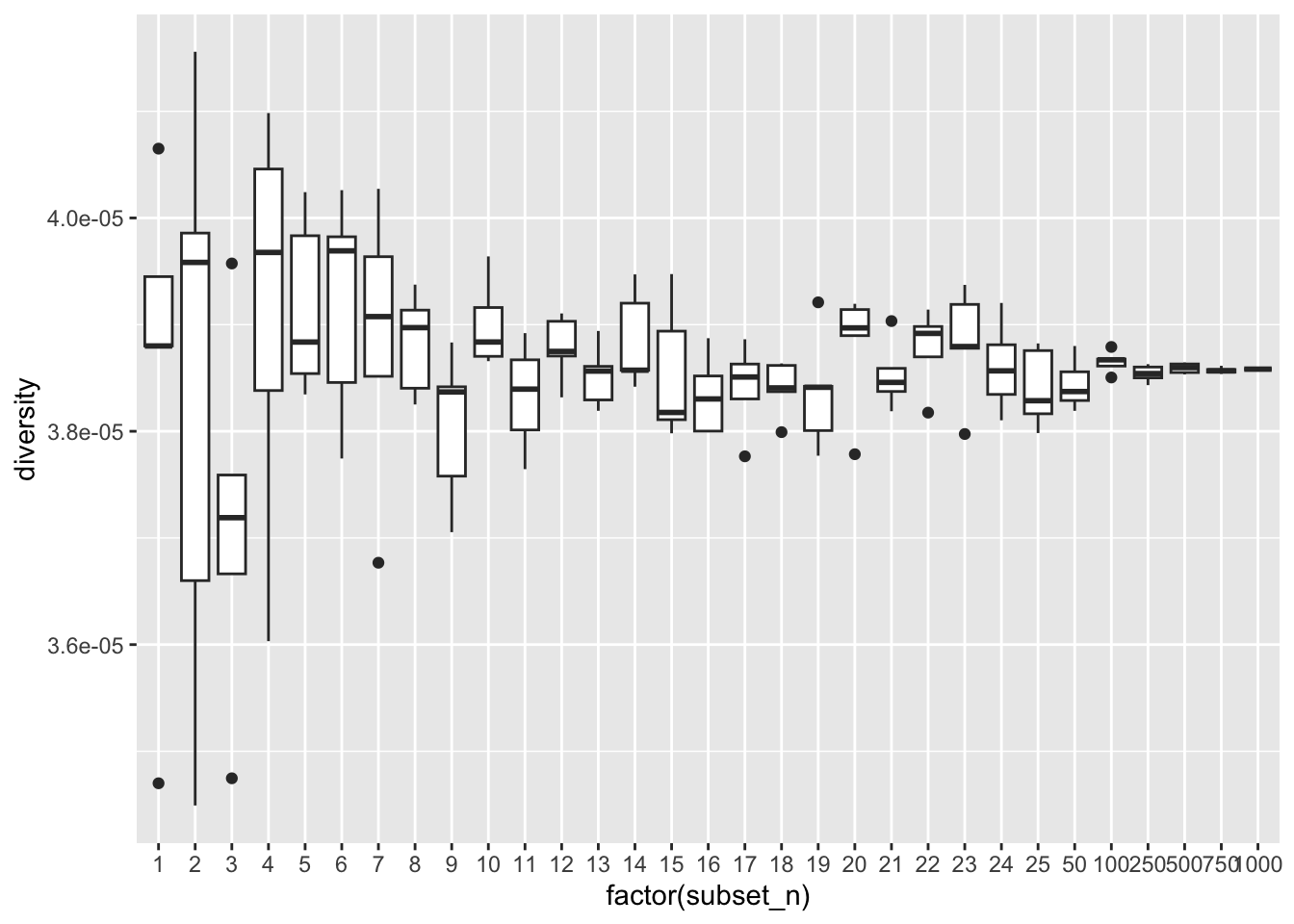
Bonus exercise: Your own model
If you got all the way here while the others are still working on their solutions, here’s a bonus exercise for you.
Take a demographic model of an organism or a population which is of your interest in your own research (either your own model or a model you know from the literature) and program it with slendr. Feel free to be as detailed (or not) as possible, but don’t worry about accuracy of various parameters. The point is to practice building a model from scratch. Then, compute the basic summary statistics introduced in this chapter on simulations from your model. Do the results match what you know, either from your research or from the literature? If not, what could be the problem?
If these statistics aren’t particularly interesting or relevant for your research, don’t despair. Again, the point is to practice, but even then, you’ll have plenty of opportunities to compute more interesting things throughout this course, particularly during the “freeform” sessions at the very end.