library(slendr)
init_env()Building slendr models
Preparation
A couple of points before we start this chapter.
- Every one of your solutions for each exercise should contain these two lines of code. If you get errors about missing functions, simulation failures, etc., make sure your script starts with these lines.
- Always write your solution in a dedicated script as instructed by each exercise. Don’t write everything into a single long file. Don’t run your code solution only in your R console without having them recorded in a script.
Exercise: Forward direction of time
Create a new R script and saved it as slendr_models_forward.R. Write your solutions to this exercise into that script.
Encode the demographic model sketched in the following diagram using a series of population() calls, then compile it with compile_model(), storing it in the model variable. Finally, verify the correctness of the model visually using using the function plot_model().
Hint: Try to get into the habit of executing each command you add to your script (a line of code, a couple of lines, etc.) in your R console by pressing Ctrl (or Cmd)+Enter as you’re writing your solutions.
Note: At this moment, the time value has a completely arbitrary unit to be determined later. Additionally, unless otherwise specified, the size N will always indicate the “effective population size” \(N_e\).
NoteClick to see the solution
As always, we start our new script by loading slendr itself and activating its environment:
library(slendr)
init_env()
Adding to the script, we begin by creating the first population, called p1, storing it in a variable with the same name. When we execute this line and type p1 in the R console, we get an informative summary. Especially when building very complex models with slendr, it pays off to develop the habit to program models like this, one command at a time, always making sure that what we are programming matches what we want to program!
p1 <- population("p1", time = 1, N = 1000)

p1
slendr 'population' object
--------------------------
name: p1
non-spatial population
stays until the end of the simulation
population history overview:
- time 1: created as an ancestral population (N = 1000)Here is, then, the complete solution:
library(slendr)
init_env()

p1 <- population("p1", time = 1, N = 1000)
p2 <- population("p2", time = 100, N = 1000, parent = p1)
p3 <- population("p3", time = 200, N = 1000, parent = p2)
p4 <- population("p4", time = 300, N = 1000, parent = p3)

model <- compile_model(populations = list(p1, p2, p3, p4), generation_time = 1, simulation_length = 401)

plot_model(model)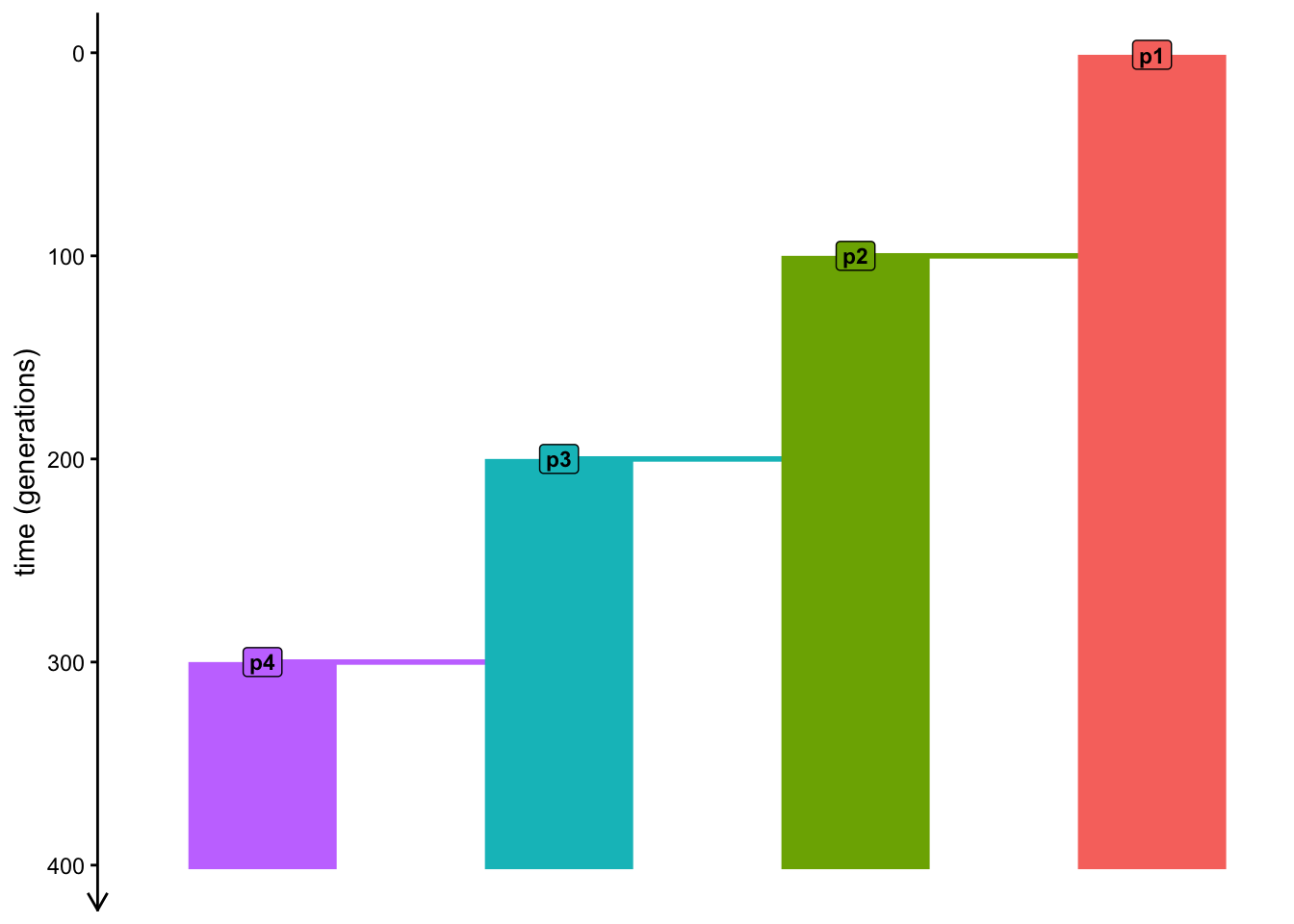
What happens when you don’t specify the simulation_length argument of the compile_model() function? Do you get an error if you leave out this argument? Why?
Exercise: Backward direction of time
Unlike most other simulation frameworks, slendr gives us a lot of flexibility in how to encode the time units of our models, or even the direction of time used by our models.
Create a new R script and saved it as slendr_models_backward.R. Write your solutions to this exercise into that script.
Convert your forward model into using a backward direction of time (i.e., the model will implicitly end at time 0—“the present day”—and start at the appropriate “time ago”). You can start by copying the contents of slendr_models_forward.R into your new script, and modify its features accordingly. Again, visualize the final model using the plot_model() function, which should get you (visually) exactly the same figure.
NoteClick to see the solution
To solve this exercise, we simply have to take the total length of our original forward simulation and reverse the times of schedules event accordingly.
Note that this is very annoying to do—and it is what’s necessary to do with many frameworks other than slendr. This convenient flexibility of slendr becomes even more apparent once we start dealing with more realistic time units.
library(slendr)
init_env()

p1 <- population("p1", time = 400, N = 1000)
p2 <- population("p2", time = 300, N = 1000, parent = p1)
p3 <- population("p3", time = 200, N = 1000, parent = p2)
p4 <- population("p4", time = 100, N = 1000, parent = p3)

model <- compile_model(populations = list(p1, p2, p3, p4), generation_time = 1)

plot_model(model)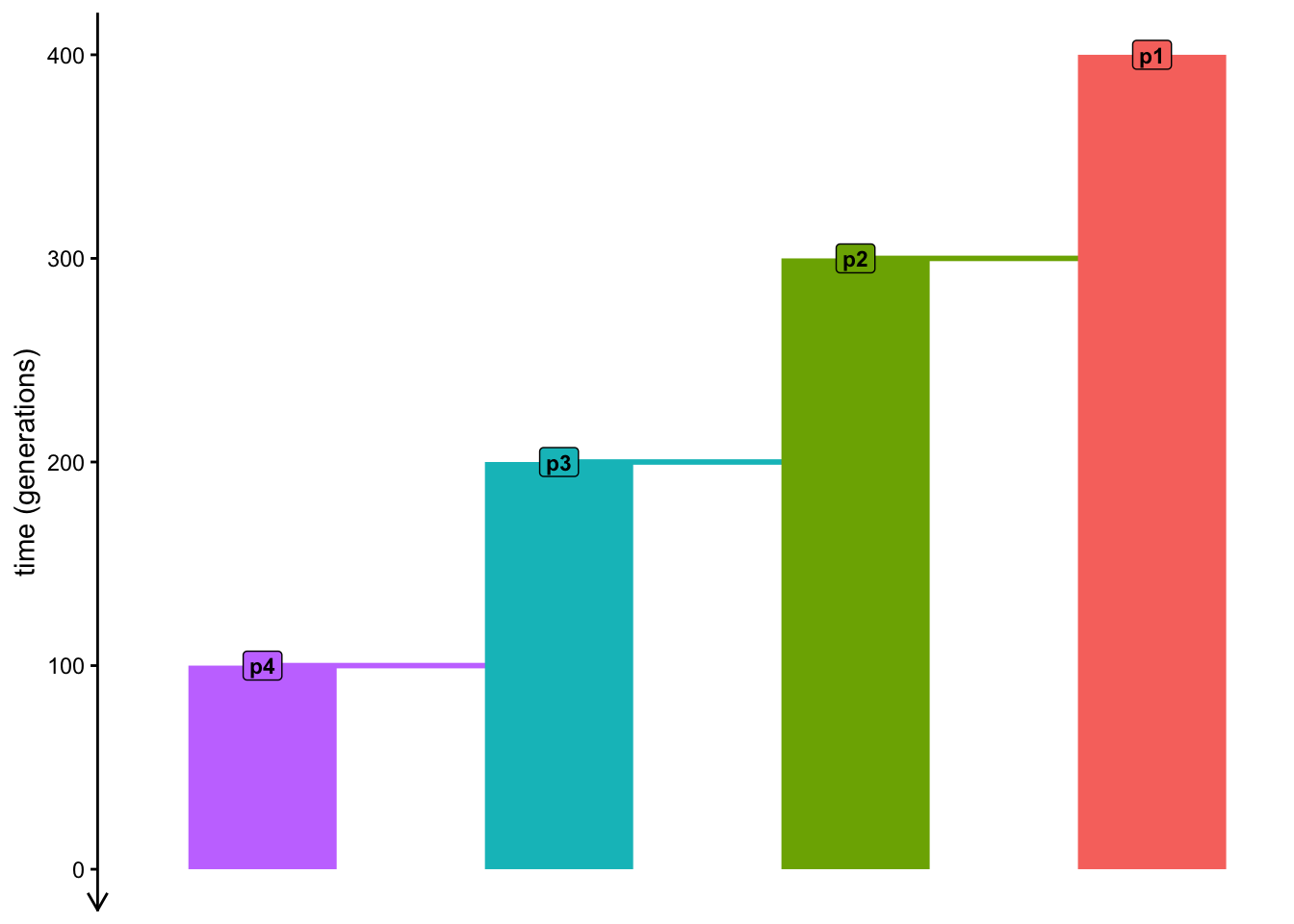
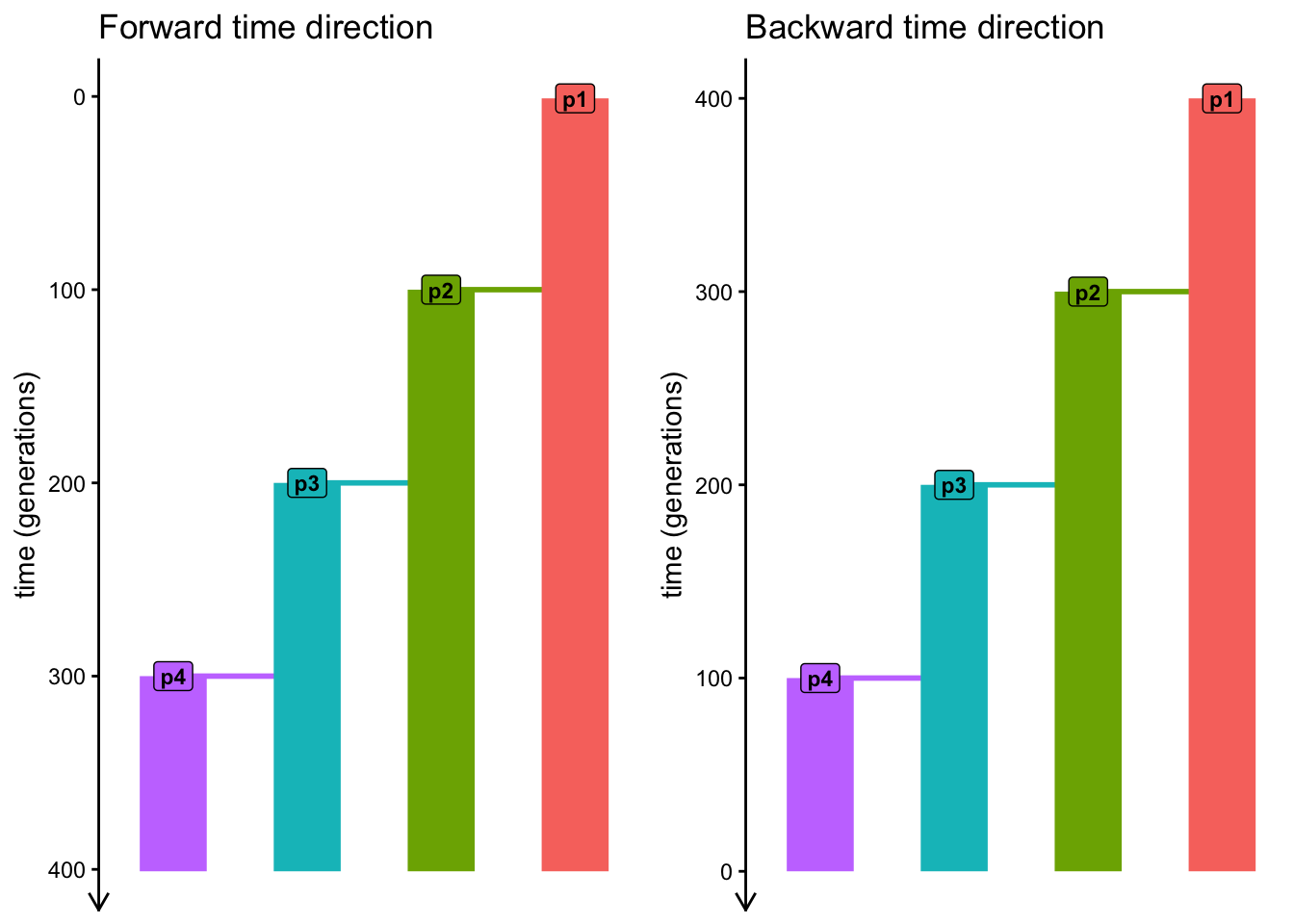
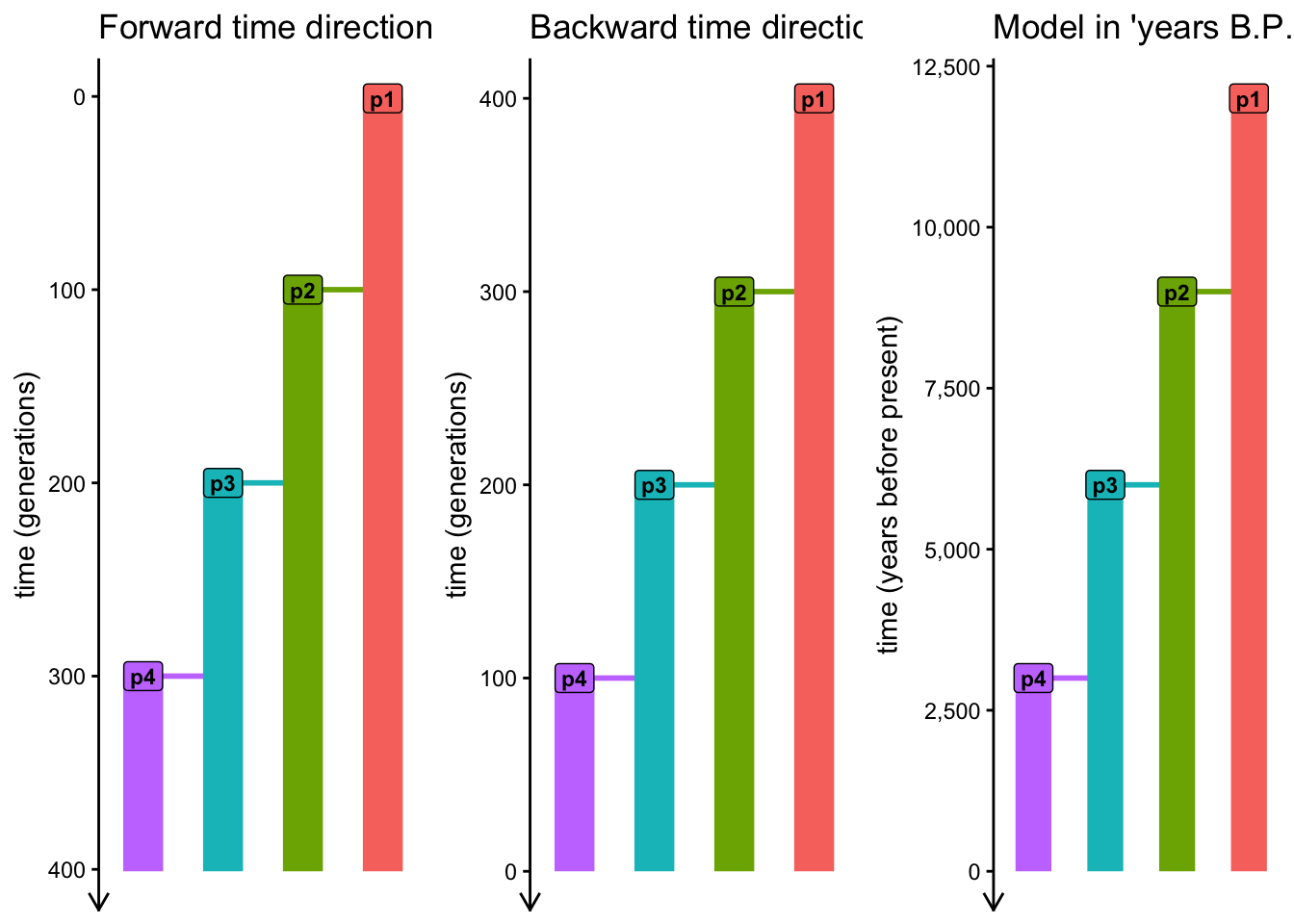
Indeed, when we compare both figures side by side, we see that the forward and backward versions of the two model give the same figure (except for the “direction” of time units along the y-axis):
In the previous exercise, leaving out the simulation_length argument resulted in an error. Do you get an error when you leave it out this time? Why? Or why not?
What happens when you set this argument to a number that is shorter than the intended duration of the model in the schematic at the beginning, like setting simulation_length = 120? What would this imply about our programmed model?
NoteClick to see the solution
On the other hand, if we do set it to a smaller number, we effectively “truncate” the duration of the model. This is arelatively rare thing to do, but it could be useful in some circumstances, so it’s worth mentioning here:
model <- compile_model(populations = list(p1, p2, p3, p4), generation_time = 1, simulation_length = 120)

plot_model(model)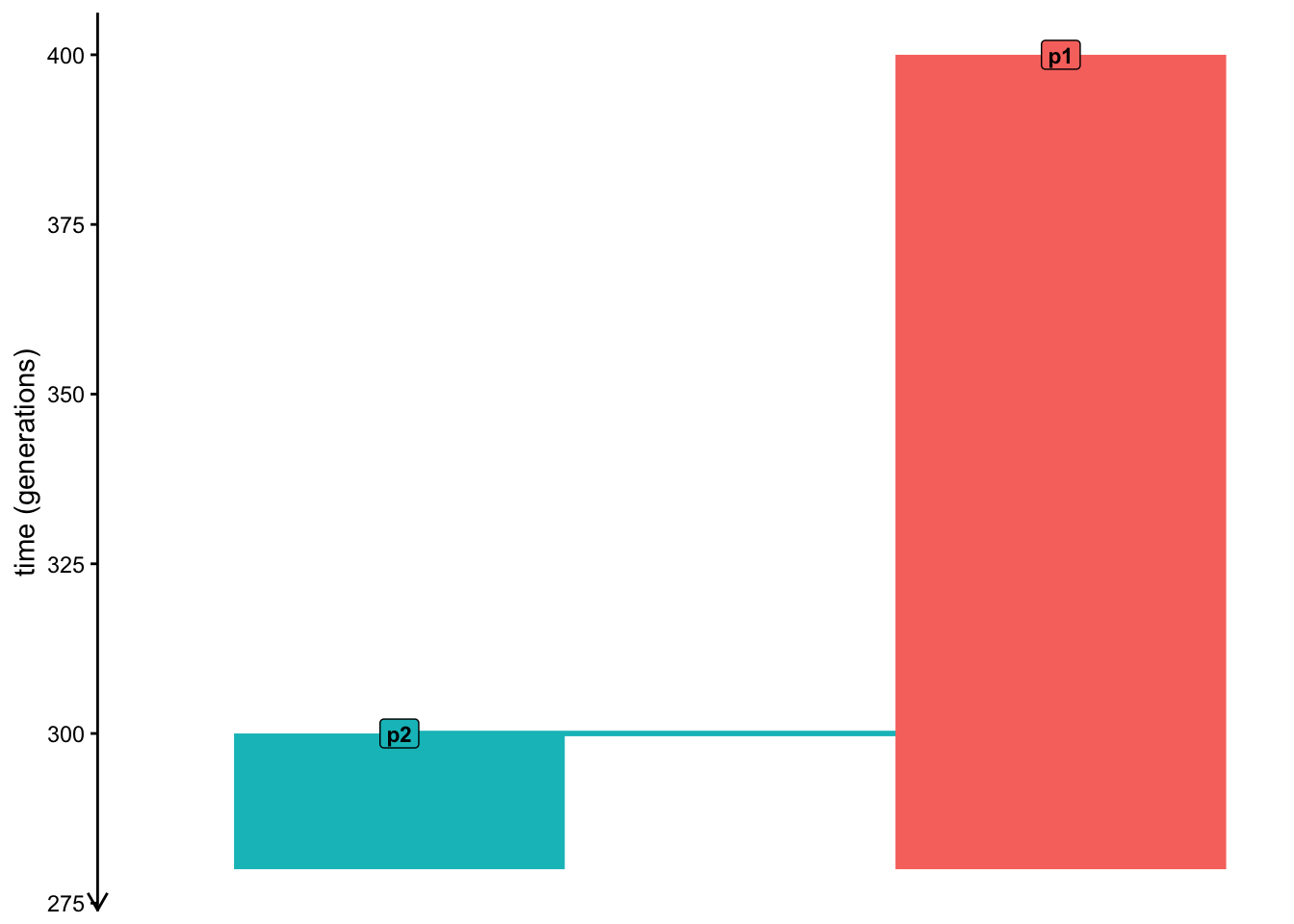
We can again compare the two models side by side to see the truncation more clearly:
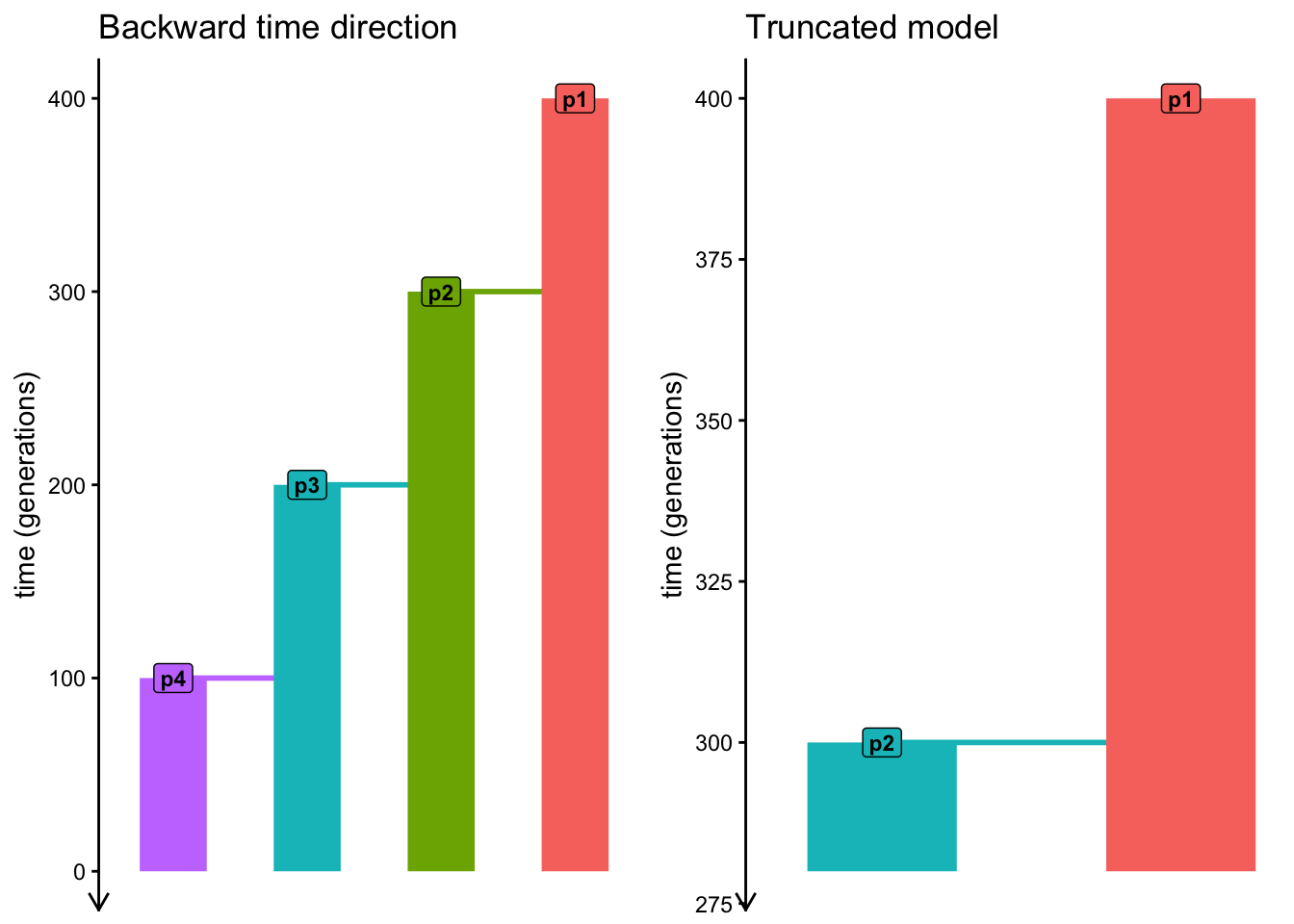
Note: As I’m writing this solution, I just noticed that the colorscheme is wrong between the two visualization. That’s a huge benefit of teaching—it puts me into situations and applications I wouldn’t normally encounter! In fact, many improvements and new slendr features I introduced over the years have come up during teaching. Fixing this is already on my list of improvements.
Exercise: Custom time units
For more theoretical or general models, specifying time in generations going forward (or backward) is generally enough. However, in more empirical settings, encoding times in other units can be quite handy. For instance, imagine you work with ancient DNA samples assigned with radiocarbon dates which use units of “years before the present”. Having to manually convert such times into generations gets cumbersome quickly, both when programming models and when analyzing simulated sequence data.
This is where the generation_time argument of compile_model() comes into the picture—with this argument, we instruct slendr on how should the various “genetic time numbers” in our model code interpreted as “real-world numbers”. Additionally, there’s another optional argument called time_units which we can use to give the numbers an explicit description.
In a new script slendr_models_human.qmd add a copy of your “backwards time” model code from above, then change it so that the time units can be interpreted as “years before present (BP)”, using the approximate human generation time of 30 years. Then visualize the model again to make sure you’ve programmed everything correctly.
Hint: You will want to modify the times of all demographic events in your model—originally in units of generations—so that they are effectively 30-times larger (so that the times represent human generation times), and make them run from larger values to smaller values (so that they represent units “years before present (BP)”). Finally, for clarity, you might want to use the time_units argument of compile_model() to give the units this description.
NoteClick to see the solution
library(slendr)
init_env()

p1 <- population("p1", time = 12000, N = 1000)
p2 <- population("p2", time = 9000, N = 1000, parent = p1)
p3 <- population("p3", time = 6000, N = 1000, parent = p2)
p4 <- population("p4", time = 3000, N = 1000, parent = p3)

model <- compile_model(
  populations = list(p1, p2, p3, p4),
  generation_time = 30,
  time_units = "years before present"
)

plot_model(model)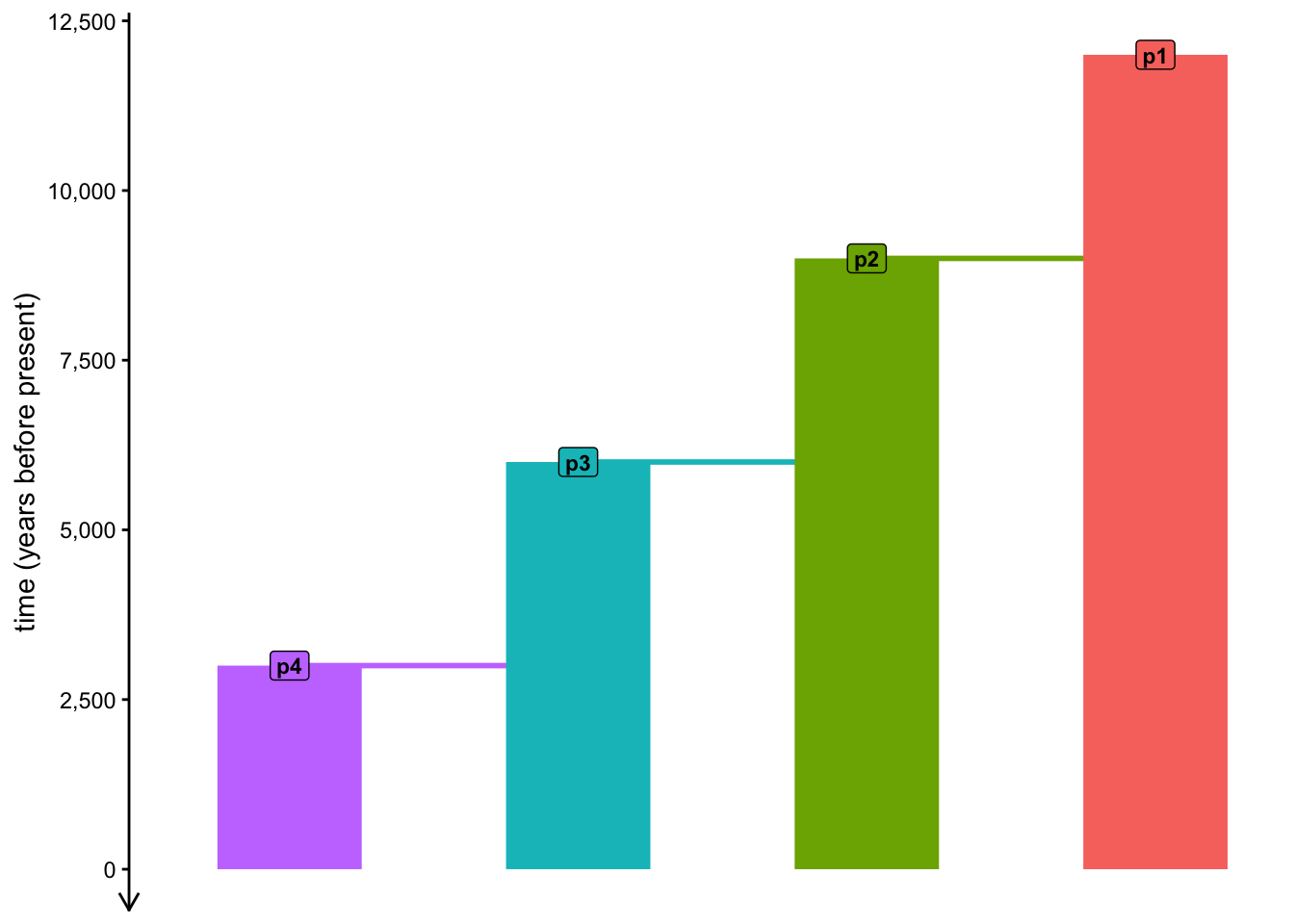
Again, when we compare this model to the very first model (which used time units of generations running forward in time), we see that they are completely identical—only the presentation changes (giving us much more convenience), but the population genetics theory underlying this model remains the same!
Exercise: Programming gene flow
Of course, real-world populations don’t just split from one another or change their size. Another common demographic process is gene flow (also called admixture or introgression in various context and in different species).
Modify your slendr_models_human.qmd script by using the function gene_flow() to program admixture from population “p2” into population “p3” starting at time 3000 “years B.P.”, with an end at time 2200 “years B.P.”. Set the total proportion of the “p2” ancestry in “p3” at 0.1 (i.e., 10% of the final “p3” population will be derived from “p2”).
NoteClick to see the solution
library(slendr)
init_env()

p1 <- population("p1", time = 12000, N = 1000)
p2 <- population("p2", time = 9000, N = 1000, parent = p1)
p3 <- population("p3", time = 6000, N = 1000, parent = p2)
p4 <- population("p4", time = 3000, N = 1000, parent = p3)

gf <- gene_flow(from = p2, to = p3, start = 3000, end = 2100, proportion = 0.1)

model <- compile_model(
    populations = list(p1, p2, p3, p4), gene_flow = gf,
    generation_time = 30,
    time_units = "years before present"
)

plot_model(model, proportions = TRUE)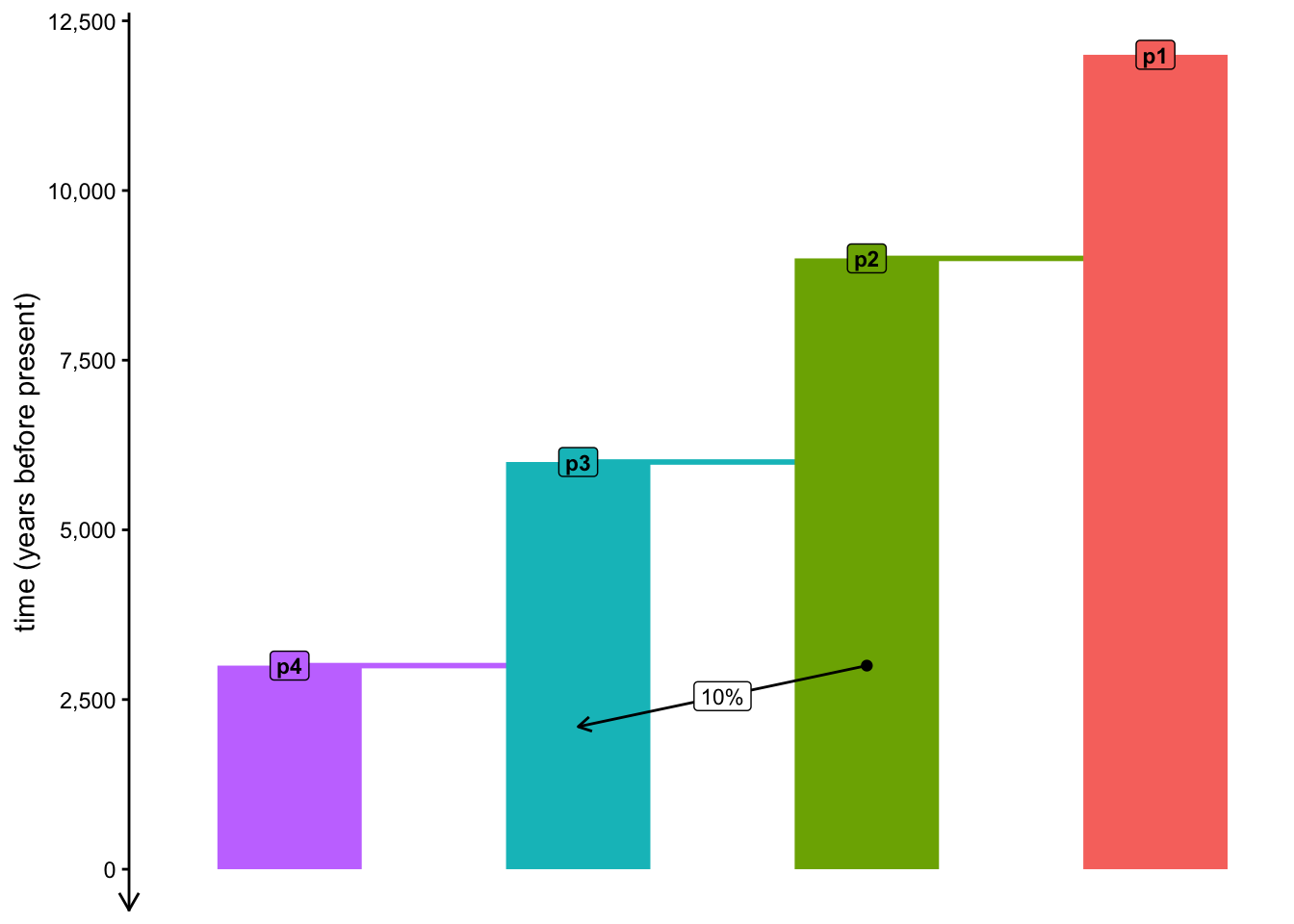
When you look at ?gene_flow help page, you can see that the function has a migration_rate argument. What does it do? Is there any way to get the same result (i.e., to encode the same gene-flow event) as you did just above, but using rate instead of proportion? When would you expect to use one or the other?
NoteClick to see the solution
A 10% proportion of p2 ancestry derived from p3 over the time window of 3000 to 2100 years B.P. is mathematically equivalent to a per-year rate of 0.1 / (3000 - 2100), i.e. 1.1111111^{-4}. To express this in a slendr model, take a look at the modified call to gene_flow() below:
library(slendr)
init_env()

p1 <- population("p1", time = 12000, N = 1000)
p2 <- population("p2", time = 9000, N = 1000, parent = p1)
p3 <- population("p3", time = 6000, N = 1000, parent = p2)
p4 <- population("p4", time = 3000, N = 1000, parent = p3)

year_rate <- 0.1 / (3000 - 2100)
gf <- gene_flow(from = p2, to = p3, start = 3000, end = 2100, migration_rate = year_rate)

model <- compile_model(
    populations = list(p1, p2, p3, p4), gene_flow = gf,
    generation_time = 30,
    time_units = "years before present"
)

plot_model(model, proportions = TRUE)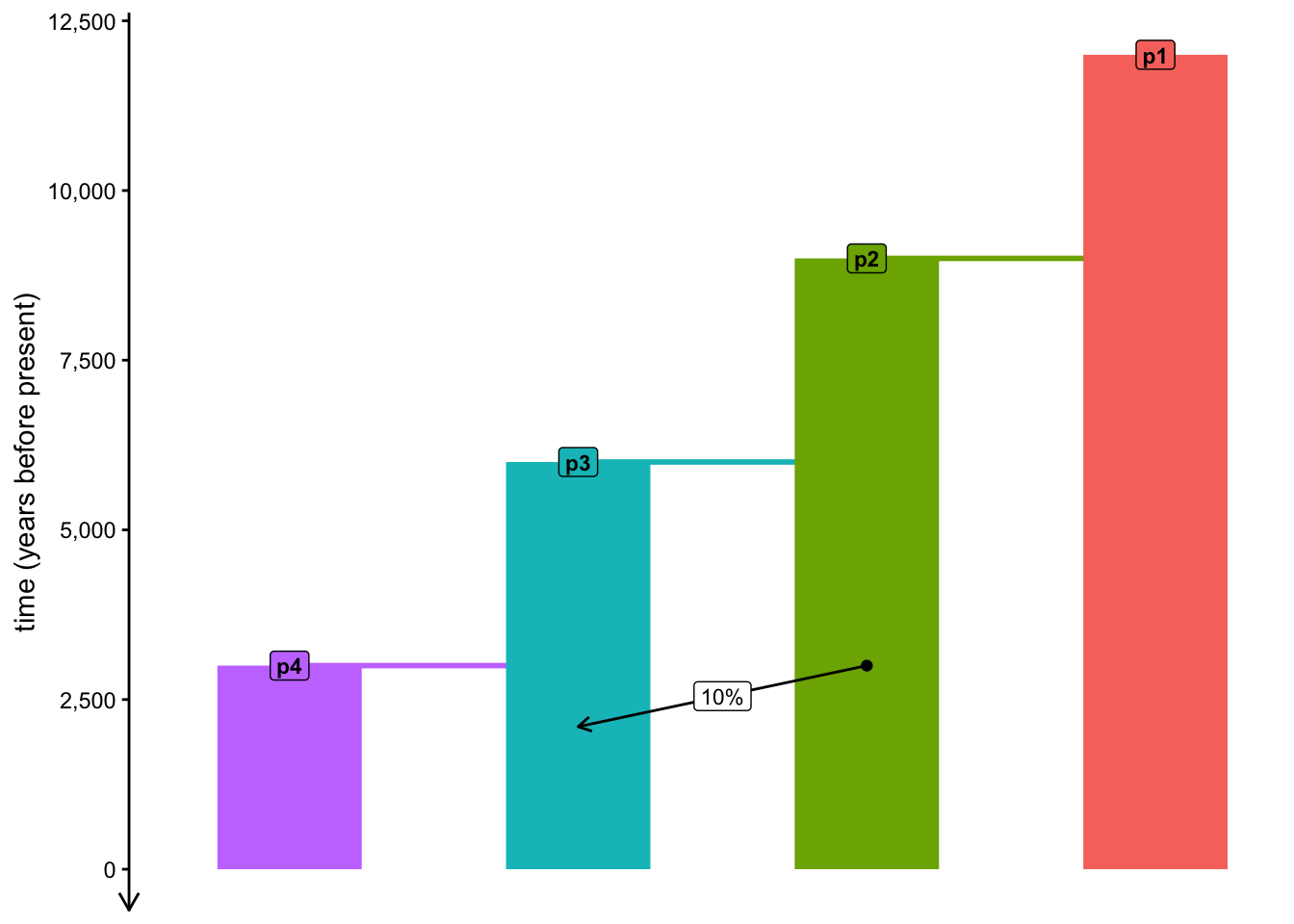
Exercise: Common slendr errors
As noted above, slendr is designed around interactive use, executing little bits of code at a time, making sure that potential errors are caught as soon as we make them, rather than after spending lots of time programming long simulation scripts.
However, software errors often confuse new programmers, especially because most errors represent completely trivial typos and unintended mistakes rather than conceptual issues with our model’s logic. This is why it’s a good idea to spend a few moments to study the most common errors recognize why they occur in isolated, controlled settings.
First, let’s do a bit of a setup using things you already know. Create a new script called slendr_models_errors.R, just to have a “throwaway script” to experiment in without breaking your other working code.
Create an R variable pop containing a slendr population (using the population() function) with the name “pA”, at time 1 and with the \(N_e\) of 5000. Then, create a population “pB” of the same size, which splits from “pA” at time 100..
When you do this, slendr automatically infers that you intend to specify time in your model flowing in the forward direction (i.e., times of events move from smaller numbers to larger numbers). Not only that, from this point on, slendr also enforces all following demographic events to follow this time direction!
To see how this works, create a third population named “pC”, which splits from “pB” at time 80. What does slendr do when you do this? What’s the closest appropriate value of pC’s split time which would be consistent with slendr’s assumptions for the direction of time for this model?
As another example, let’s look at gene_flow(), which programs gene flow between two populations represented by two R variables. Let’s say that you try to program:
42% gene flow from
pAtopCstarting at time 200 and ending at time 150, orgene flow starting at time 150 and ending at time 200.
Which of those two calls to gene_flow() do you think will result in an error and why?
Note: There are other cases in which even the enforcement of model consistency described above still allows broken models to be programmed, which is why compile_model() provides yet another set of sanity checks. But we will leave those aside for now. If you end up running into these issues, this exercise has already equipped you to understand why slendr sometimes gives errors and how to interpret them to fix your models.
Exercise: Resize events
Of course, populations in traditional demographic models in evolutionary and population genetics don’t just split and mix—they also experience population bottlenecks, population expansions, contractions, etc. The means to program these demographic events is through the function resize().
In slendr, these events come in two variants, which we can call step resizes or exponential resizes.
- Step resizes
We can implement immediate step resize events simply by calling the function resize(), providing the new size N and the time at which the resize event should occur.
- Exponential resizes
If we need to implement exponential resize event (either exponential increase or decrease of population size), we provide the new size N, the time at which the resizing should start (same as for step resizes) but also the time at which it should end. From this information, slendr is able to interpolate the resizes needed at each time point in order to simulate the gradual exponential change.
Practice the use of the resize() function by programming a bottleneck event in the history of the population p3 in your script slendr_models_human.qmd. The bottleneck should happen at 1800 years BP, with the population contracting to the size of 100 individuals. Then program the recovery of this population, resizing in a step-wise fashion to size of 2000 individual at time 1000 years BP. Use the function plot_model() to visualize your new model and validate that you’ve programmed the bottleneck scenario correctly (remember to call it by setting its argument proportion = TRUE).
NoteClick to see the solution
library(slendr)
init_env()

p1 <- population("p1", time = 12000, N = 1000)
p2 <- population("p2", time = 9000, N = 1000, parent = p1)
p3 <- population("p3", time = 6000, N = 1000, parent = p2) %>%
  resize(N = 100, time = 1800) %>%
  resize(N = 2000, time = 1000)
p4 <- population("p4", time = 3000, N = 1000, parent = p3)

gf <- gene_flow(from = p2, to = p3, start = 3000, end = 2100, proportion = 0.1)

model <- compile_model(
  populations = list(p1, p2, p3, p4),
  gene_flow = gf,
  generation_time = 30,
  time_units = "years before present"
)

plot_model(model, proportion = TRUE)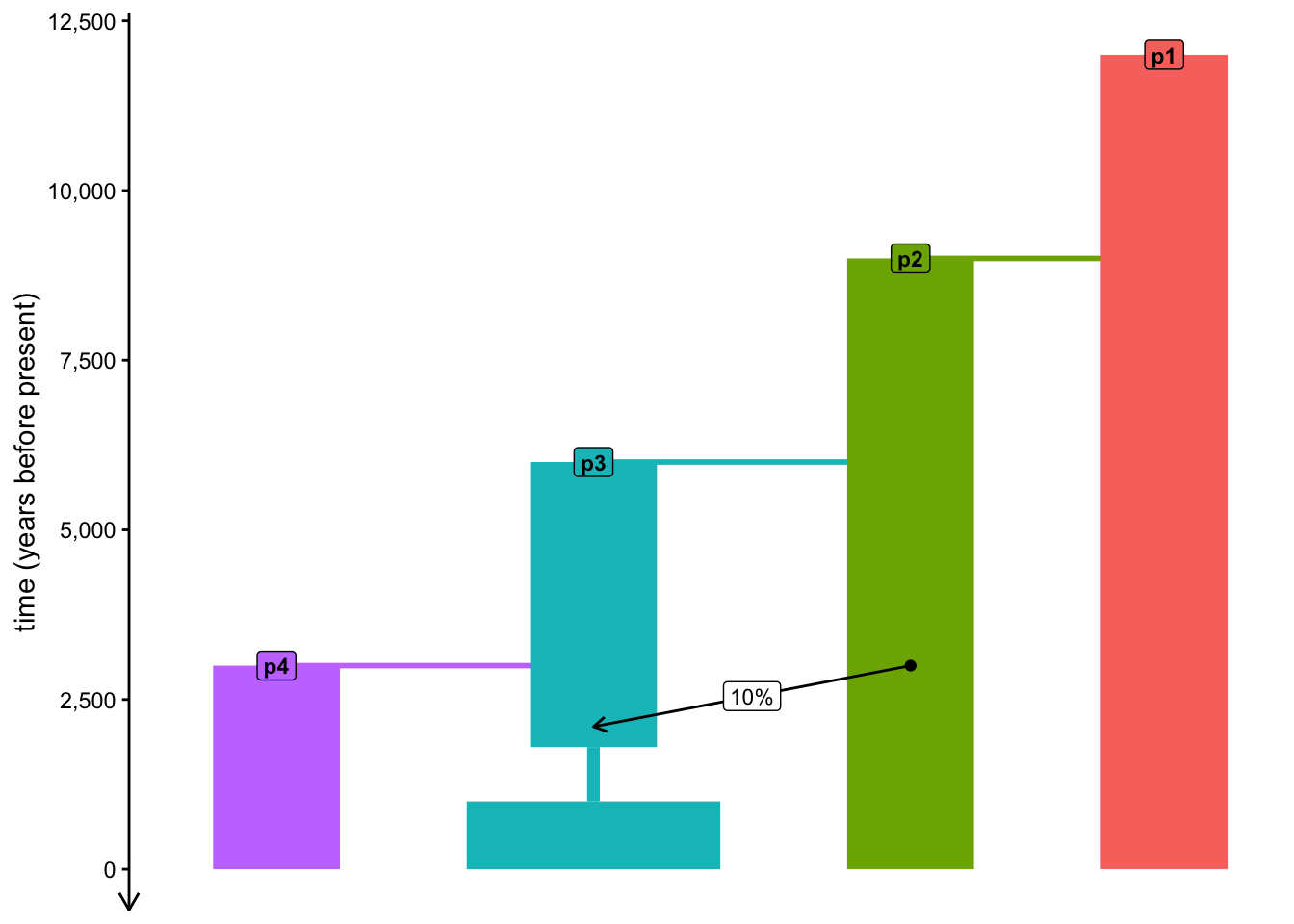
Note: The visualization of the exponential is a bit wonky in that it makes things look like a gradual linear change—apologies for that! This will be fixed in a future slendr version.
Catch up
If you want to just catch up to the point at which this section would conclude, here is the version of our simulation script at the end of the final exercise:
NoteClick to see the solution
library(slendr)
init_env()

p1 <- population("p1", time = 12000, N = 1000)
p2 <- population("p2", time = 9000, N = 1000, parent = p1)
p3 <- population("p3", time = 6000, N = 1000, parent = p2) %>%
  resize(N = 100, time = 1800) %>%
  resize(N = 2000, time = 1000)
p4 <- population("p4", time = 3000, N = 1000, parent = p3)

gf <- gene_flow(from = p2, to = p3, start = 3000, end = 2100, proportion = 0.1)

model <- compile_model(
    populations = list(p1, p2, p3, p4), gene_flow = gf,
    generation_time = 30,
    time_units = "years before present"
)

plot_model(model, proportions = TRUE)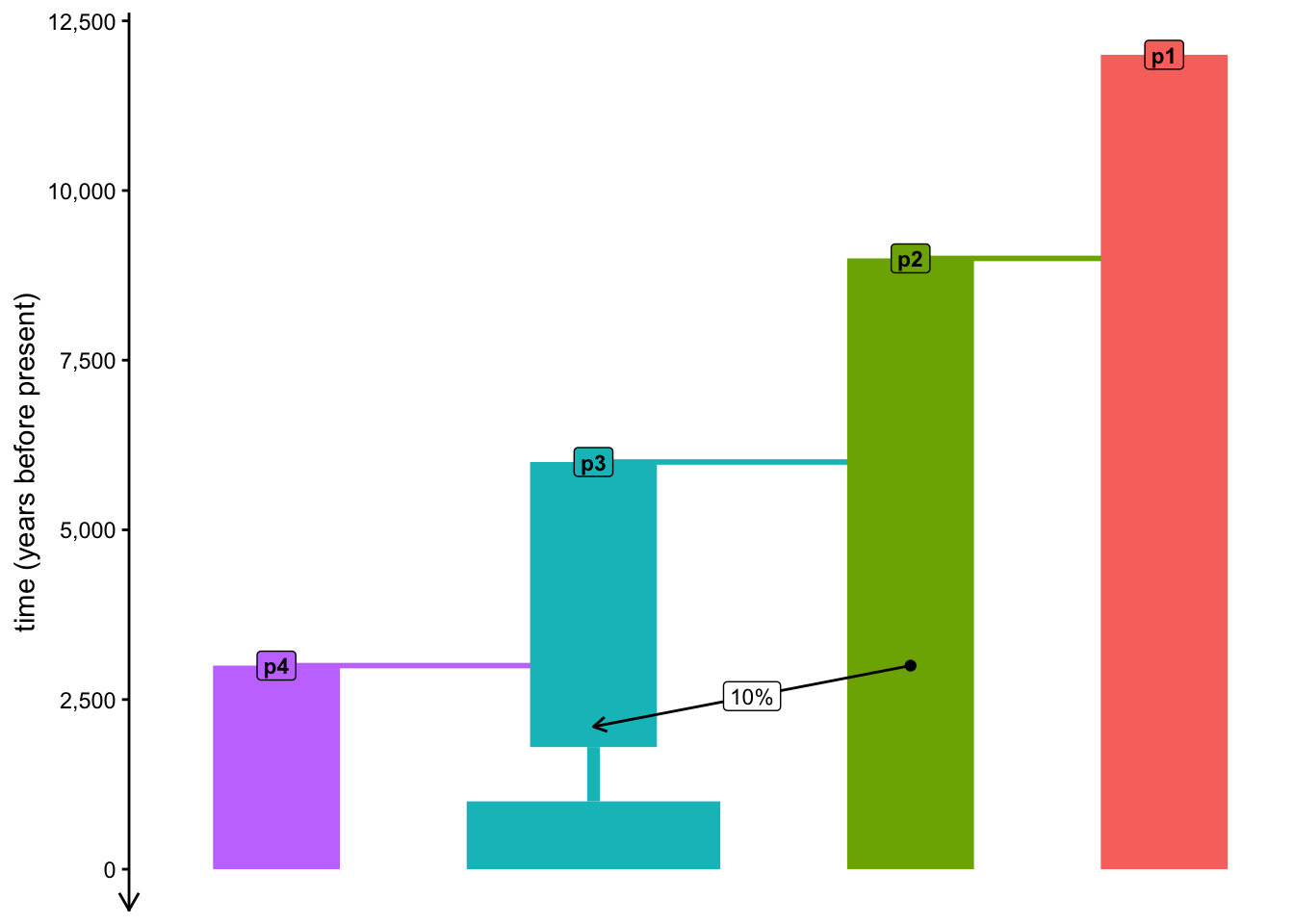
Bonus exercise: Models on disk
Feel free to skip this exercise, unless you managed to run through everything quickly and want to learn a little bit about slendr internals. Especially if you’re a little bit familiar with msprime or SLiM, this might be quite interesting.
A very important part of slendr’s approach to modeling is to make simple things be trivially easy. This is largely why expressing even relatively complex models with slendr requires so little code compared to the amount of programming needed with traditional powerful simulators.
Still, sometimes it’s useful to peek behind the curtain and see what exactly is going on inside slendr and how it operates.
Type out the model object in the R console, paying attention to the description of the path where it’s been compiled. Use your operating system disk browsing program (Finder on macOS, File Explorer on Windows, or any other means of browsing files on other systems, such as the terminal shell) to see what files are hiding in that path. Given the model we’ve programmed so far, pay particular attention to populations.tsv and geneflow.tsv. What format do those files have? Can you decipher the meaning of the information they store by comparing it to your own model R code?
What is stored in the file script.py and script.slim? If you know either of those languages, can you decipher how slendr simulates data, internally?