In this session, you will practice building demographic models using the programmable modeling interface of the R package slendr (please make sure you went through the setup instructions first). Admittedly, there are many valid definitions for what a “demographic model” could be, but in the context of this book, we will generally think about models as “tree-like topological structures encoding the relationships between populations and gene flows between them”. For completeness (and for the time being), these models will be always neutral and will conform to Wright-Fisher assumptions (random-mating individuals, non-overlapping generations, no selection).
If you ever get really stuck on one of the exercises, take a look at solutions provided with each of them. The goal here is to learn things and get you comfortable with computer programming, not fight through endless frustration. That said, a little frustration is a necessary component of any learning process, so try not to look at the solutions automatically and immediately. Always take a stab at solving each exercise on your own first and then, if you decide to look at my solution, try to understand my code on your own, step by step, before you run it by copying it into your R console.
Exercise 1: Building a demographic model in slendr
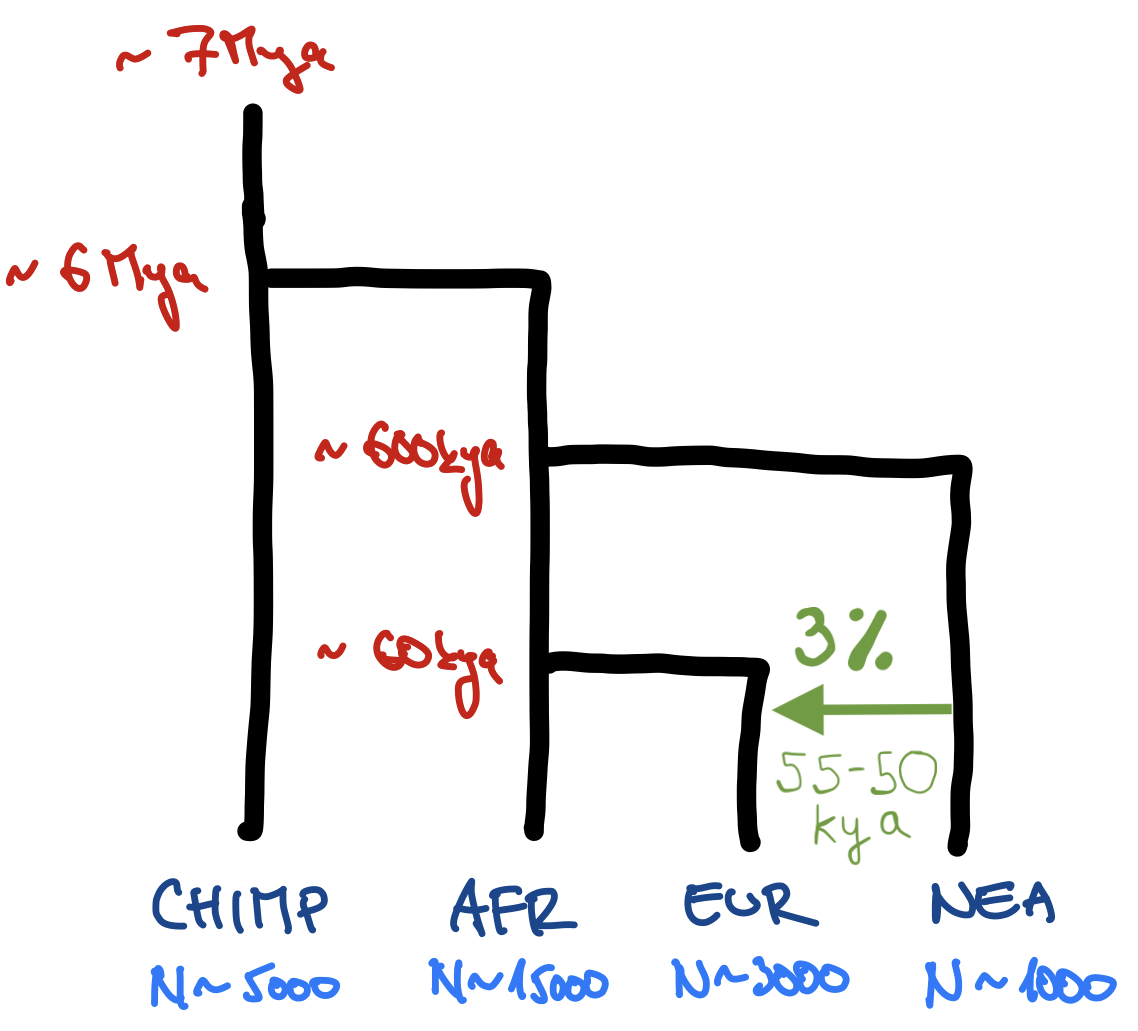
Take a look at the following toy model of human demographic history (apologies for my bad handwriting and the lack of any artistic skill). Then program this model using slendr functions such as population(), gene_flow(), and compile_model(), which we discussed in our introduction on “Simulations with slendr”.
[Mya = million years ago, kya = thousand years ago]
Hint: Create a new script popgen-models.R in your RStudio session containing the “template script” below. Then add a sequence of appropriate population() calls using the syntax from the introduction (remember that you should use the parent = argument of this function to encode splits of daughter populations), gene_flow(), etc. If in doubt, always remember that you can read a help page of a function by typing something like ?population in your R console.
library(slendr)init_env(uv =TRUE)# <put `population()` calls here like we discussed in the introduction># <replace this with your gene-flow definition, stored in variable `gf`>model <-compile_model(populations =list(...), # <put your list of populations here>gene_flow = gf,generation_time =30)
Hint: Note that the times such as “7 Mya” (i.e., 6 million years ago) must be written in R as integer numbers (in this case, 7000000 or 7e6). Also take note of the “backwards” encoding of time units which, in this case, indicate that the times represent units of “years before present”.
Note: You can program the model so that ancestral lineages are represented as separate population() calls (i.e., your model would start with a population called “human_chimp_ancestor” from which a “CHIMP” and “hominin_ancestor” populations would split at 6 Mya, etc.) but this gets tedious quickly. Feel free to write the model so that “CHIMP” is the first population, then “AFR” population splits from it at 6 Mya, etc.
Hint: Remember that slendr is designed with interactivity in mind! When you write a chunk of code, execute that bit of code in the R console and inspect the summary information printed by evaluating the respective R object you just created. This makes sure that your understanding of your code and the code itself are in sync.
NoteClick to see the solution
library(slendr)init_env(uv =TRUE)# chimpanzee outgroupchimp <-population("CHIMP", time =7e6, N =5000)# two populations of anatomically modern humans: Africans and Europeansafr <-population("AFR", parent = chimp, time =6e6, N =15000)eur <-population("EUR", parent = afr, time =60e3, N =3000)# Neanderthal population splitting at 600 ky ago from modern humans# (becomes extinct by 40 ky ago, as indicated by the `remove` argument)nea <-population("NEA", parent = afr, time =600e3, N =1000, remove =40e3)# Neanderthal introgression event (3% admixture between 55-50 kya)gf <-gene_flow(from = nea, to = eur, proportion =0.03, start =55000, end =50000)# compile the entire model into a single slendr R objectmodel <-compile_model(populations =list(chimp, nea, afr, eur),gene_flow = gf,generation_time =30)
Exercise 2: Checking the model visually
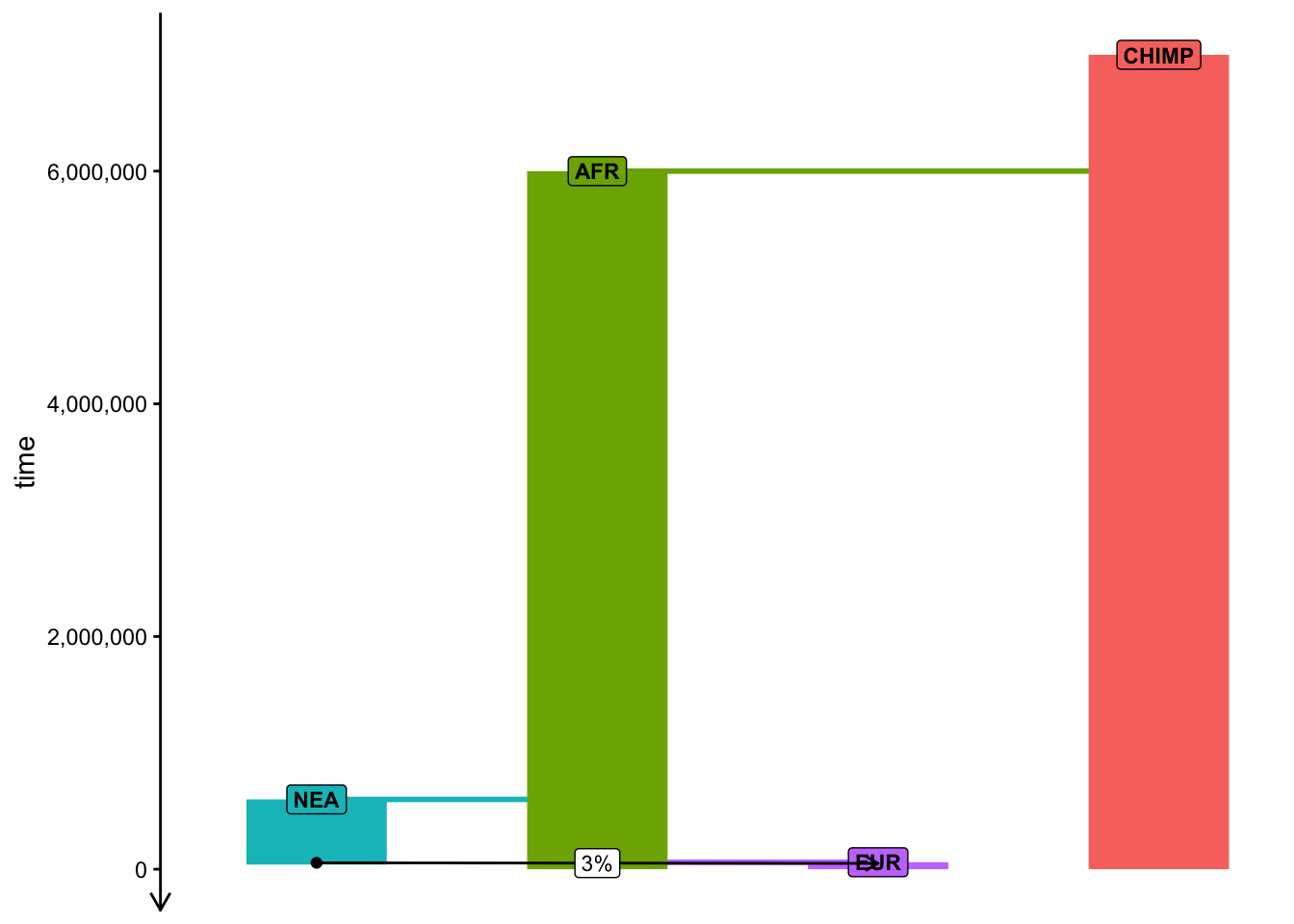
Although the text-based summares of model components in the R console are useful for troubleshooting and validation, a picture is always worth a thousand words. To visualize a given slendr model, you can use the function plot_model(). Visualize your compiled model of Neanderthal introgression to make sure you programmed it correctly! Your figure should roughly correspond to my doodle above.
Hint: Plotting of models in slendr can be sometimes a little wonky, especially if multiple splits and gene flows are happening at once. When plotting your model, you can experiment with arguments log = TRUE, proportions = TRUE, gene_flow = TRUE of this function. Check ?plot_model for more information on these optional arguments.
NoteClick to see the solution
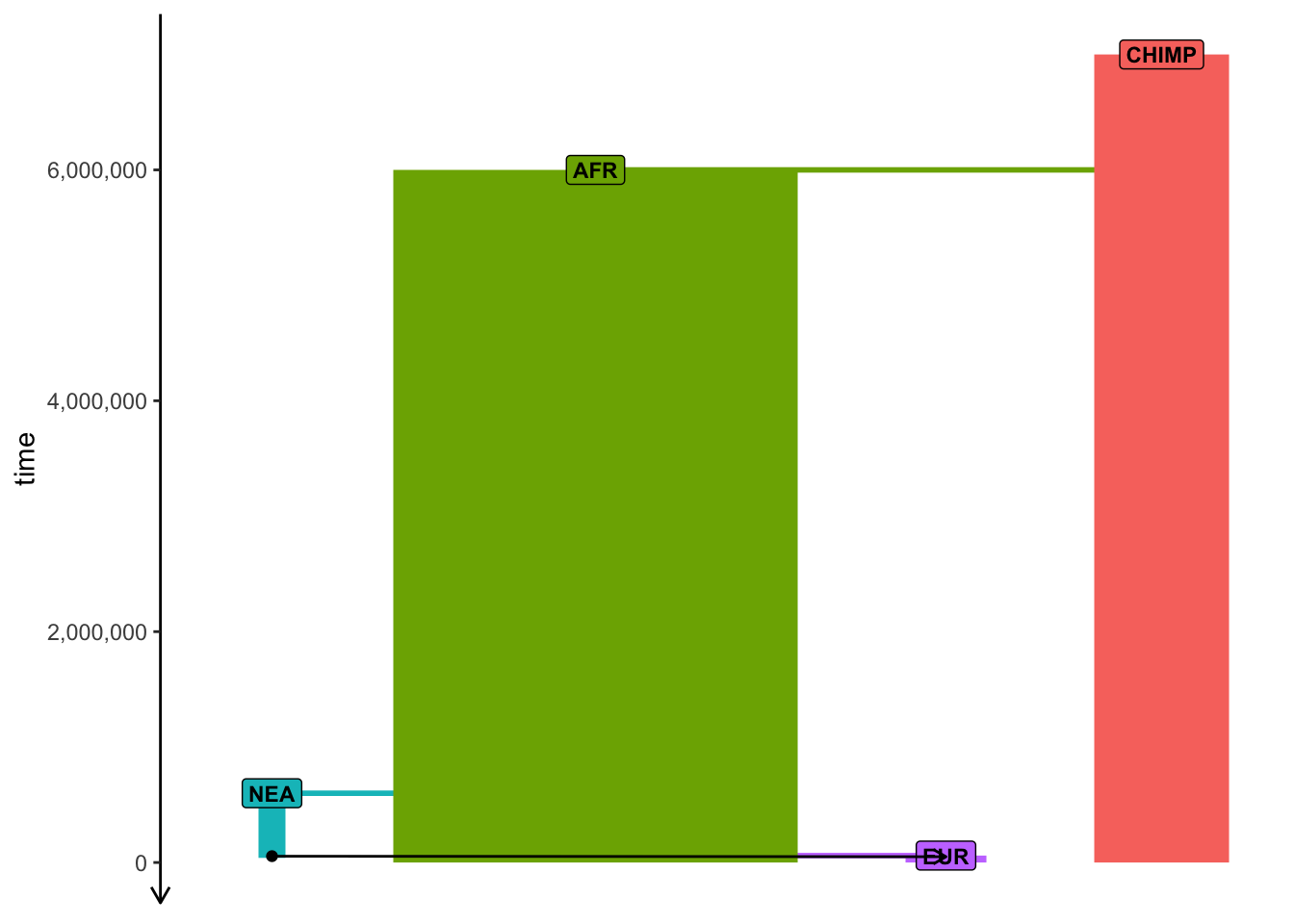
Baseline model visualization:
plot_model(model)
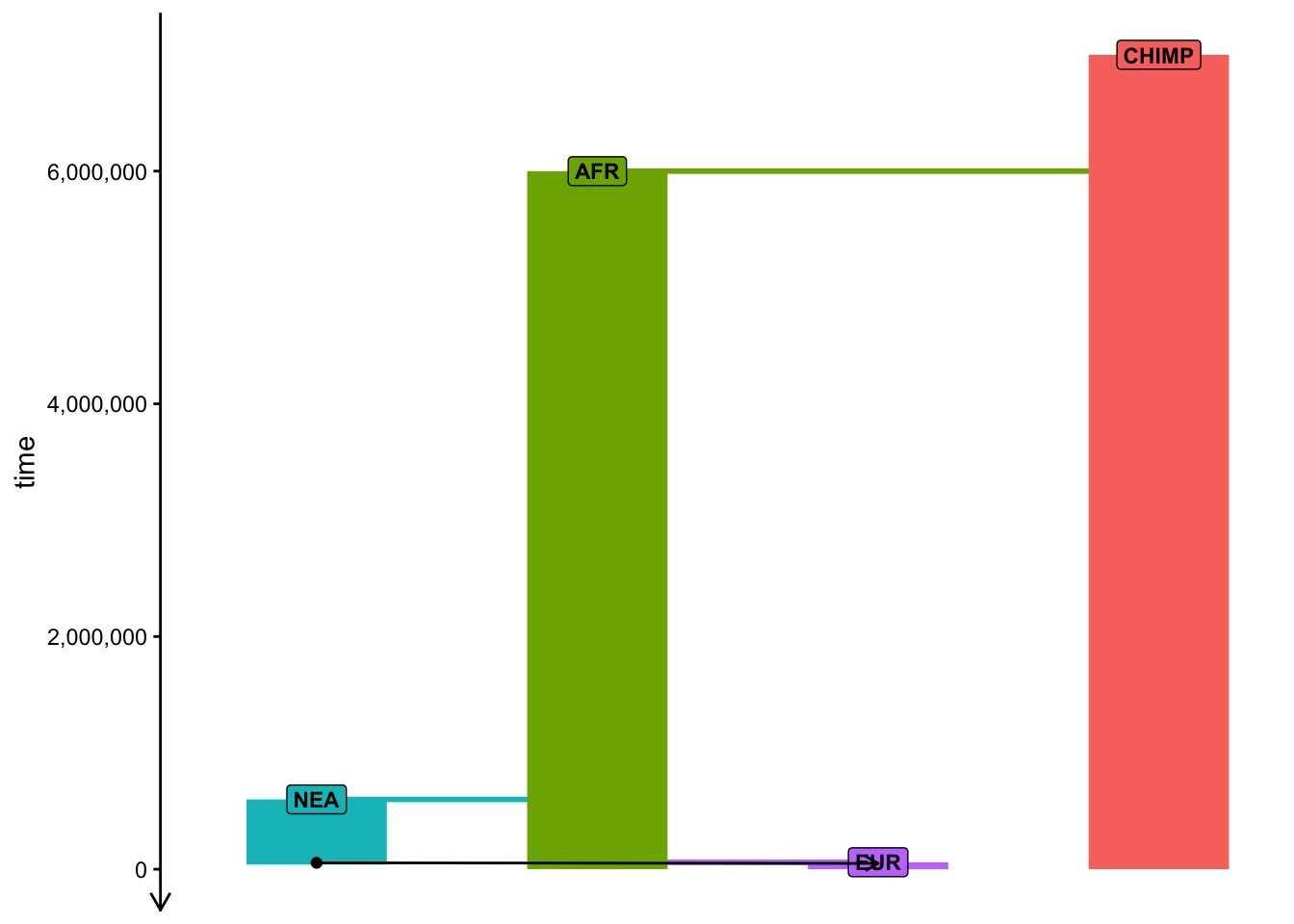
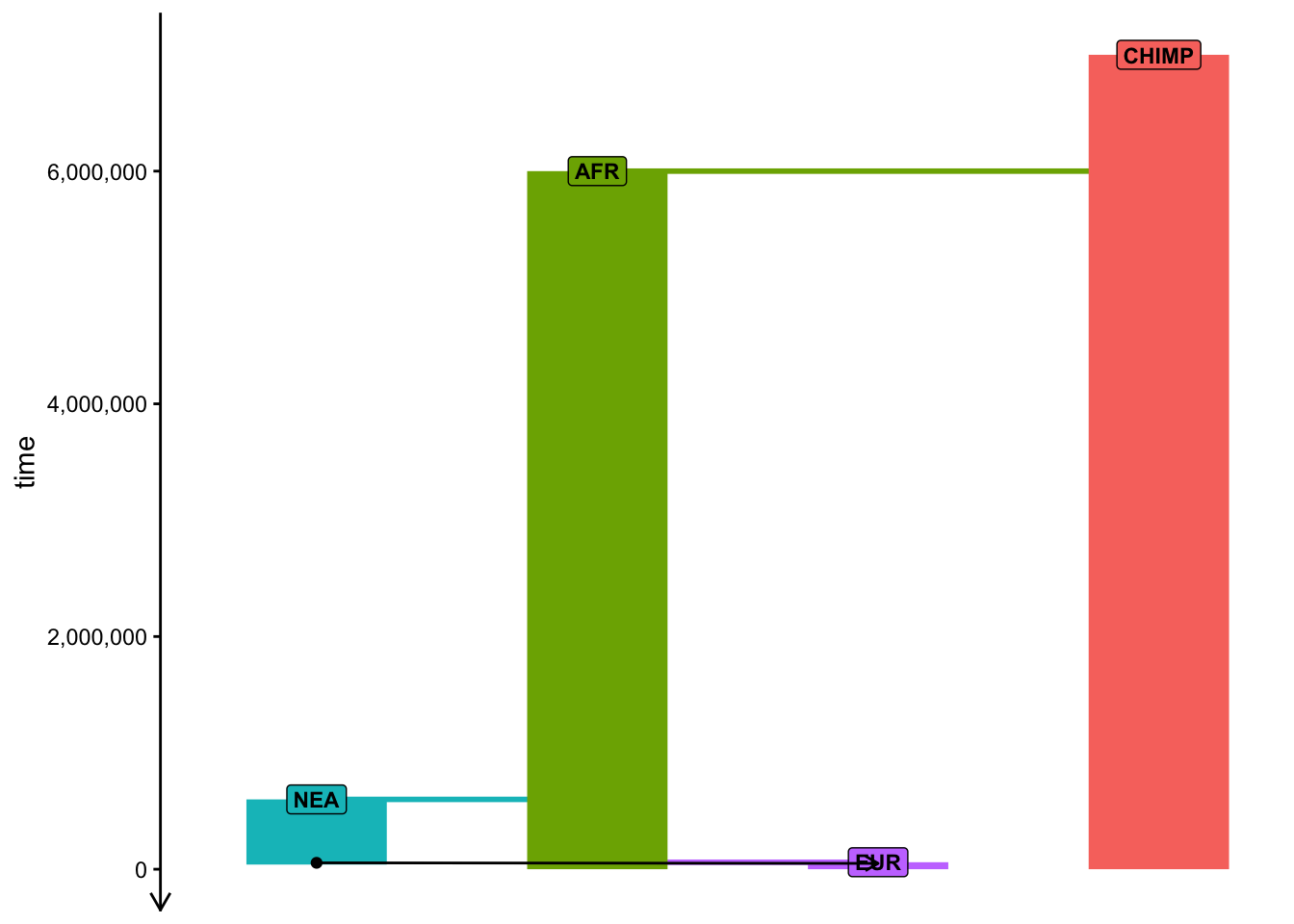
Visualization ignoring relative population sizes:
plot_model(model, sizes =FALSE)
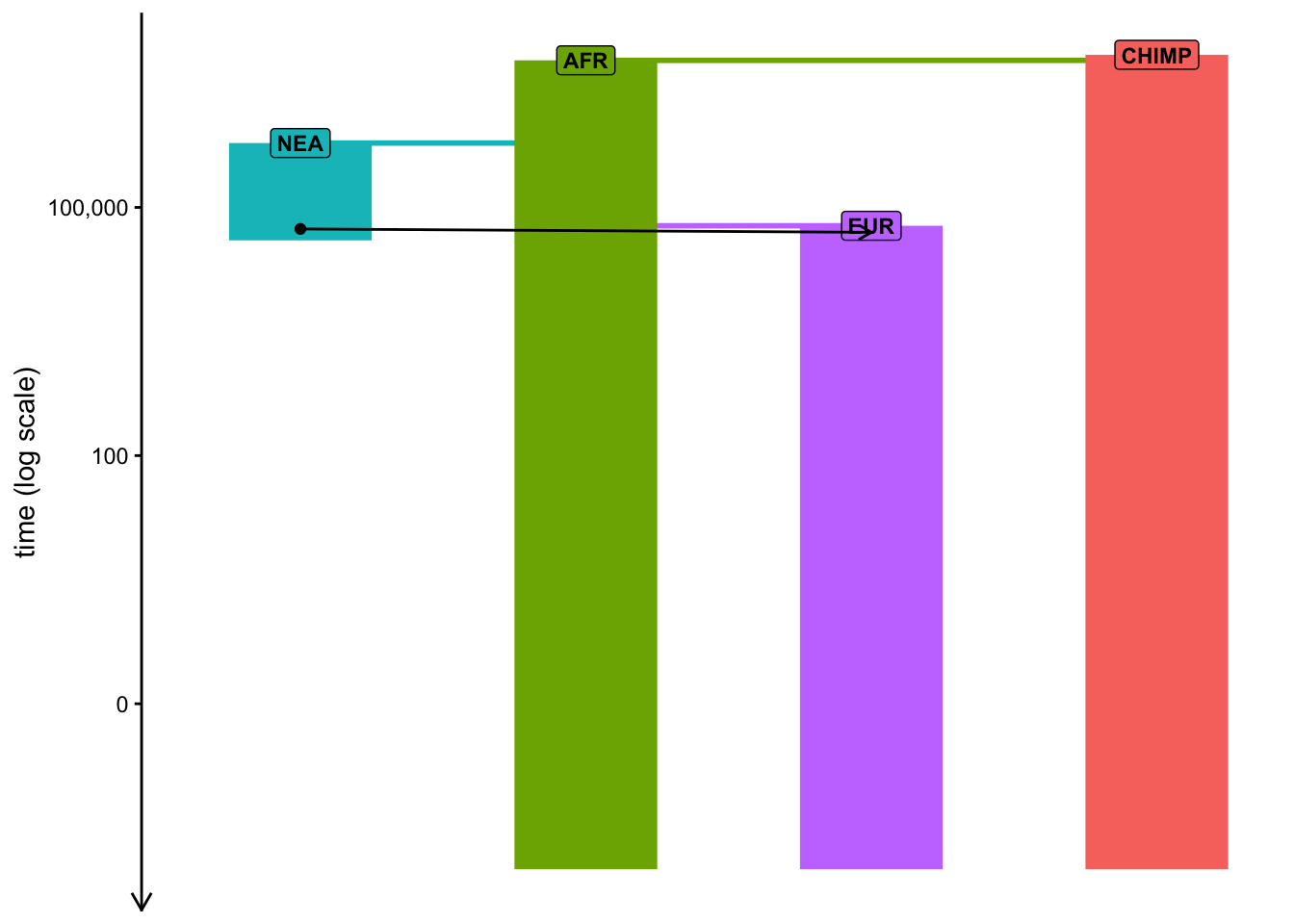
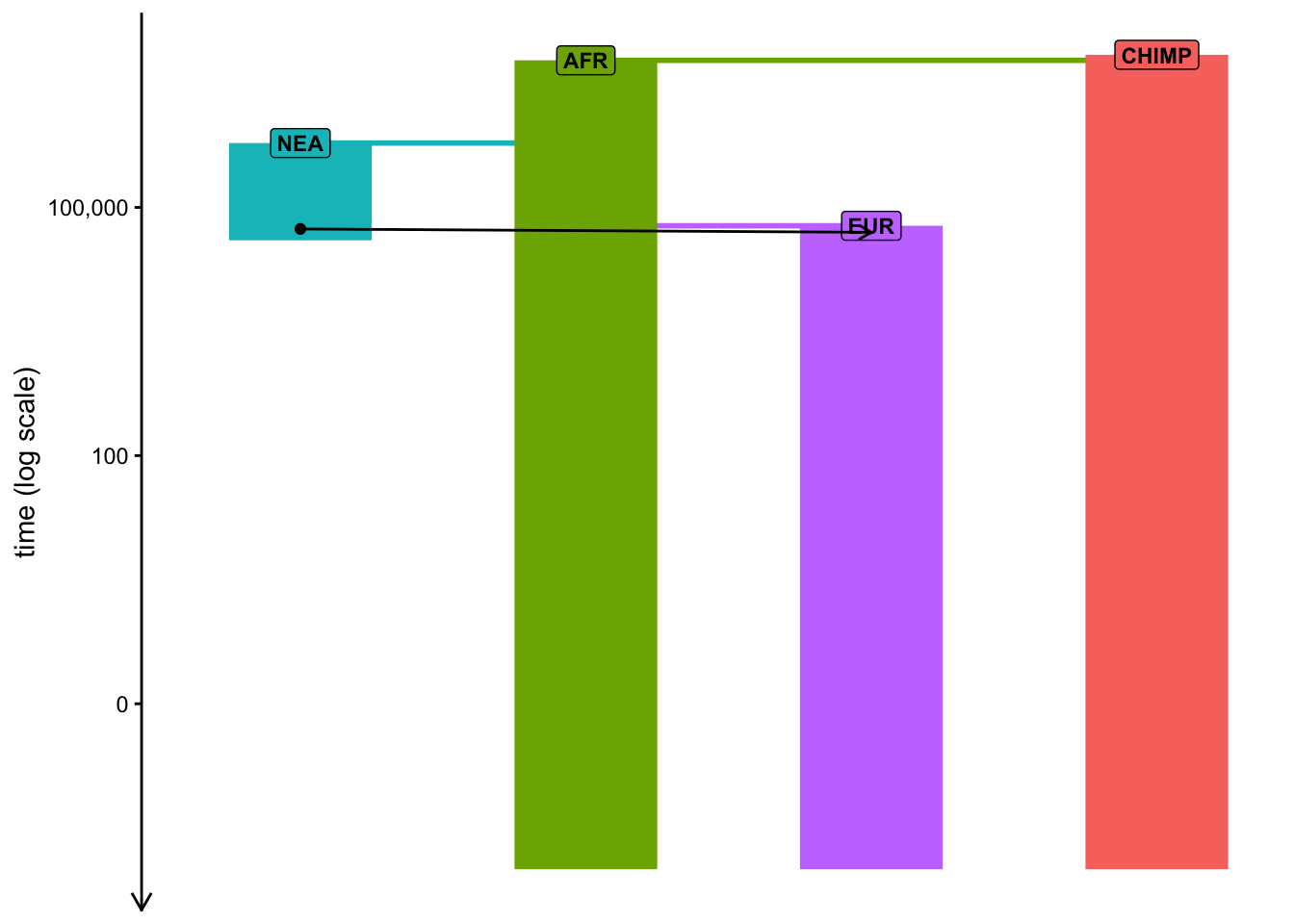
Visualization ignoring relative population sizes and plotting the vertical time axis on the logarithmic scale:
plot_model(model, sizes =FALSE, log =TRUE)
Printing the total amount of genetic ancestry resulting from gene-flow events:
Once you have compiled a slendr model and stored it in a variable (from now on, the symbol model will always refer to an R variable containing such a compiled slendr model object), we can simulate data from it. By default, a simulation from a slendr model always produces a tree sequence.
Note: As discussed in our introduction to slendr, tree sequences provide an extremely efficient means to store and work with genomic data at a massive scale. However, you can always get simulated data even in traditional file formats, such as VCF, EIGENSTRAT, or a plain table of ancestral/derived genotype states.
In this section, we will be only working with tree sequences, because it’s much easier and faster to get interesting statistics from it directly in R, but don’t forget that you can compute the same statistics from simulated VCF or EIGENSTRAT files using any of the available software methods as well.
There are two simulation engines built into slendr implemented by functions msprime() and slim(). For traditional, non-spatial, neutral demographic models, the engine provided by the msprime() function is much more efficient, so we’ll be using that for the time being. However, from a population genetics theoretical perspective, both simulation functions will give you the same results for any given compiled slendr model (up to some level of stochastic noise, of course). The alternative engine implemented by the slim() function plays an important role for spatial simulations and for simulations of natural selection.
Note: Yes, this means you don’t have to write any msprime (or SLiM) code to simulate data from a slendr model!
As we discussed in the introduction, here’s how you can use simulate a tree sequence from a compiled slendrmodel:
ts <-msprime( model,sequence_length =<length of sequence to simulate [in bp]>,recombination_rate =<uniform recombination rate [in per bp per generation]>)
You will be seeing this kind of pattern over and over again in this session, so it’s a good idea to internalize this pattern.
Simulate a tree sequence from your compiled model using the msprime() engine and store it in a variable ts as shown right above. Set the parameters sequence_length = 1e6 (length of the sequence in bp) and recombination_rate = 1e-8 (crossover events per base pair per generation). Then experiment by running the same command but setting either debug = TRUE and run = TRUE. What happens when you do that? Take a look at ?msprime if you need a hint.
Note: Remember that run = TRUE will not return any ts result and if you do assign the function to the ts variable, it will contain the value NULL.
NoteClick to see the solution
This command simulates a tskit tree sequence from a slendr model. Again, note that we don’t have to write any msprime or tskit code to implement the simulation because slendr does all the work for us!
Setting debug = TRUE instructs slendr’s built-in msprime script to print out msprime’s own debugger information. This can be very useful for troubleshooting, particularly in cases when we run into issues which don’t pop up in the model visualization demonstrated above.
For debugging of low-level technical issues (crashing msprime, crashing slendr, or both), it can be quite useful to instruct the msprime() function to print the command-line needed to run the simulation on the terminal using plain Python interpreter, without the involvement of R (this command-line can be long, so you might have to scroll horizontally in your browser to see the whole thing):
msprime(model, sequence_length =1e6, recombination_rate =1e-8, run =FALSE)
Similarly to the symbol model, whenever we from now on refer to ts, we will be talking about some simulated tree-sequence object stored in an R variable ts.
Exercise 4: Inspecting the tree sequence
As we will see later, slendr makes it possible to compute a wide array of popular population genetic statistics using its R interface to the Python module tskit.
For now, type out the ts object in the terminal — what do you see?
NoteClick to see the solution
You should get a summary of a tree-sequence object with some lower-level technical details about the genomic sequence which it encodes:
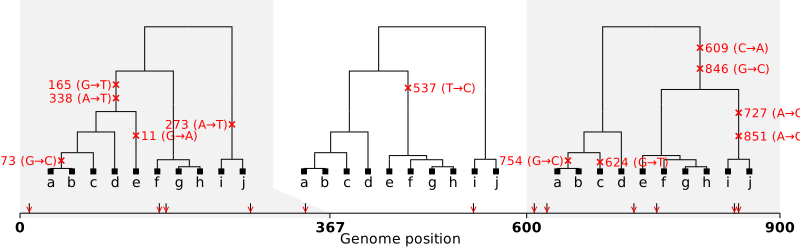
The genius of the tree-sequence data structure rests on its elegant table-based implementation (much more information on that is here). slendr isn’t really designed to run complex low-level manipulations of tree-sequence data (like iterating over individual trees, mutations on those trees, etc.) as its strength lies in the convenient interface to population genetic statistical functions implemented by tskit, but it does contain a couple of functions which can be useful for inspecting the lower-level nature of a tree sequence. Let’s look at some of them right now.
Use the ts_table function to inspect the low-level table-based representation of a tree sequence. Take a look at ?ts_table manual page to learn how to use this function. How many nodes does it have, and how many edges? Does the tree sequence contain any mutations? If not, why, and how can we even do any population genetics with data without any mutations? As you’re answering these questions, take a look at at the following figure (this was made from a different tree sequence than you have, but that’s alright) to help you relate the information in the individual tables (node table, edge table, etc.) to your tree sequence.
Note: This exercise will not teach you much about how are simulations of tree sequences helpful for your research, but it should convince you that the final product of a slendr simulation really is a data structure encoding the full extent of a genomic variation in your sample (either simulated or empirical). You don’t have to study these tables in detail, this is just to remind you that they are always there, under the hood.
NoteClick to see the solution
The slendr helper function ts_table() accepts two arguments: the first one is a tree-sequence object ts, the second indicates which of the tree-sequence tables we want to inspect:
We didn’t simulate any mutations, so we only have genealogies for now:
ts_table(ts, "mutations")
# A tibble: 0 × 5
# ℹ 5 variables: id <dbl>, site <int>, node <int>, time <dbl>, time_tskit <dbl>
ts_table(ts, "sites")
# A tibble: 0 × 2
# ℹ 2 variables: id <dbl>, position <dbl>
There are also two important slendr functions called ts_recorded() (which retrieves the “symbolic names” and dates of all recorded individuals at the end of a simulation) and ts_nodes(). You can run them simply as ts_recorded(ts) and ts_nodes(ts). How many individuals (i.e. diploid samples) are in your tree sequence as you simulated it? How is the result of ts_nodes() different from ts_recorded()?
NoteClick to see the solution
We can see that our tree sequence contains a massive number of individuals. Too many, in fact — we recorded every single individual alive at the end of our simulation, which is something we’re unlikely to be ever lucky enough to have, regardless of which species we study.
# A tibble: 3 × 2
  pop       n
  <chr> <int>
1 AFR   15000
2 CHIMP  5000
3 EUR    3000
The function ts_nodes() returns a table similar to the one produced by ts_table(ts, "nodes") above, except that it contains additional slendr metadata (names of individuals belonging to each node, spatial coordinates of nodes for spatial models, etc.). This makes it a bit more useful for analyzing tree-sequence data than the “low-level” functions, if that’s something you ever need to do.
In the table produced by ts_recorded() in the previous exercise, you saw that the tree sequence we simulated recorded “everyone” living at the end of the simulation which amounted to a few tens of thousands of individuals. However, unless we’re very lucky, it’s extremely unlikely that we’ll ever have a sequence of every single individual in a population that we study. To get a little closer to the scale of the genomic data that we usually work with on a day-to-day basis (and to avoid wasting computational resources on unnecessarily massive simulations), we can restrict our simulation to only record a subset of individuals.
We can precisely define which individuals (from which populations, and at which times) should be recorded in a tree sequence using the slendr function schedule_recording(). For instance, in our model of introgression, we have created slendr populations stored in variables eur and afr, and we can include the recording of the genomes of five individuals from both of those populations at times 10000 (years ago) and 0 (present-day) in our model with the following code:
pop_schedule <-schedule_recording( model, # the model to record genomes fromtimes =c(10000, 0), # times at which to record genomeslist(eur, 5), list(afr, 5) # which populations and how many genomes to record)
If you type the variable pop_schedule in the R console, you will see that this function returns a plain data frame (just try it). As such, we can create multiple of such schedules (of arbitrary complexity and granularity) and then bind them together into a single sampling schedule with a single line of code, like this (all this code might look overwhelming, but try to read it line by line):
# Note that the `times =` argument of the `schedule_recording()` function can be# a vector of times like here...ancient_times <-c(40000, 30000, 20000, 10000)eur_samples <-schedule_recording(model, times = ancient_times, list(eur, 1))# ... but also just a single number like hereafr_samples <-schedule_recording(model, times =0, list(afr, 1))nea_samples <-schedule_recording(model, time =60000, list(nea, 1))# But whatever the means you create the individual sampling schedules with, you# can always bind them all to a single table with the `rbind()` functionschedule <-rbind(eur_samples, afr_samples, nea_samples)# This is then the final "recording schedule":schedule
# A tibble: 6 × 8
   time pop       n name  y_orig x_orig y     x
  <int> <chr> <int> <lgl> <lgl>  <lgl>  <lgl> <lgl>
1 10000 EUR       1 NA    NA     NA     NA    NA
2 20000 EUR       1 NA    NA     NA     NA    NA
3 30000 EUR       1 NA    NA     NA     NA    NA
4 40000 EUR       1 NA    NA     NA     NA    NA
5     0 AFR       1 NA    NA     NA     NA    NA
6 60000 NEA       1 NA    NA     NA     NA    NA
Using the function schedule_recording and with the help of rbind as shown in the previous code example, program the sampling of the following sample sets at given times:
time
population
# individuals
70000
nea
1
40000
nea
1
0
chimp
1
0
afr
5
0
eur
10
Then, schedule the sampling of a single eur individual at each of the following times (i.e., every two thousand years between 40 kya and the present-day):
t <-seq(40000, 2000, by =-2000)
At the end, bind all individual schedules into a single variable schedule using the function rbind(). In total, this should give you a data frame containing the sampling schedule for the recording of of the genomes of 38 simulated individuals. Verify that this is true by summing the numbers in the n column of the final data frame schedule.
Note: You can provide a vector variable (such as t in this example) as the times = argument of schedule_recording().
NoteClick to see the solution
First we scheduled the sampling of two Neanderthals at 70kya and 40kya:
nea_samples <-schedule_recording(model, times =c(70000, 40000), list(nea, 1))nea_samples # (this function produces a plain old data frame!)
# A tibble: 2 × 8
   time pop       n name  y_orig x_orig y     x
  <int> <chr> <int> <lgl> <lgl>  <lgl>  <lgl> <lgl>
1 40000 NEA       1 NA    NA     NA     NA    NA
2 70000 NEA       1 NA    NA     NA     NA    NA
Then we schedule one Chimpanzee sample, 5 African samples, and 10 European samples:
present_samples <-schedule_recording(model, times =0, list(chimp, 1), list(afr, 5), list(eur, 10))
Then we also schedule the recording of one European sample between 50kya and 2kya, every 2000 years:
times <-seq(40000, 2000, by =-2000)emh_samples <-schedule_recording(model, times, list(eur, 1))
Because those functions produce nothing but a data frame, we can bind individual sampling schedules together at the end:
# A tibble: 25 × 8
    time pop       n name  y_orig x_orig y     x
   <int> <chr> <int> <lgl> <lgl>  <lgl>  <lgl> <lgl>
 1 40000 NEA       1 NA    NA     NA     NA    NA
 2 70000 NEA       1 NA    NA     NA     NA    NA
 3     0 CHIMP     1 NA    NA     NA     NA    NA
 4     0 AFR       5 NA    NA     NA     NA    NA
 5     0 EUR      10 NA    NA     NA     NA    NA
 6  2000 EUR       1 NA    NA     NA     NA    NA
 7  4000 EUR       1 NA    NA     NA     NA    NA
 8  6000 EUR       1 NA    NA     NA     NA    NA
 9  8000 EUR       1 NA    NA     NA     NA    NA
10 10000 EUR       1 NA    NA     NA     NA    NA
# ℹ 15 more rows
Let’s verify we scheduled the recording of genomes of everyone we needed:
sum(schedule$n)
[1] 38
Then, verify the correctness of your overall sampling schedule by visualizing it together with your model using the function plot_model() (take a look at its manpage ?plot_model to see how to do this).
Note: As you’ve seen above, the visualization is often a bit wonky and convoluted with overlapping elements and it can be even worse with samples added, but try to experiment with arguments to plot_model described above to make the plot a bit more helpful for sanity checking.
Exercise 6: Simulating a defined set of individuals
We now have both a compiled slendrmodel and a well-defined sampling schedule, so let’s finally simulate some data!
Use your combined sampling schedule to run a new tree-sequence simulation from your model (again using the msprime() function), this time restricted to just those individuals scheduled for recording. You can do this by running the following command (note that this also overlays mutations over our genealogies, which is something we didn’t do before). This will give you a new tree-sequence object stored in the ts variable.
The command below will likely take a few minutes to run, so feel free to go down from 100 Mb sequence_length to even 10Mb (it doesn’t matter much). (The random_seed = argument is there for reproducibility purposes.)
ts <-msprime(model, sequence_length =100e6, recombination_rate =1e-8, samples = schedule, random_seed =1269258439) %>%ts_mutate(mutation_rate =1e-8, random_seed =1269258439)# Time difference of 2.141642 mins
If you’re bothered by how long the simulation takes, feel free to call these two lines to 100% reproduce my results without any expensive computation:
Verify that your simulated ts object really does contain only the explicitly recorded samples, either by typing ts into the R console or, better still, using the function ts_recorded().
Note: When you think about it, it’s quite astonishing how fast msprime and tskit are when dealing with such a huge amount of sequence data from tens of thousands of individuals on a normal laptop!
NoteClick to see the solution
Inspect the (tskit/Python-based) summary of the new tree sequence (note the much smaller number of “sample nodes”!):
`summarise()` has regrouped the output.
ℹ Summaries were computed grouped by pop and age_group.
ℹ Output is grouped by pop.
ℹ Use `summarise(.groups = "drop_last")` to silence this message.
ℹ Use `summarise(.by = c(pop, age_group))` for per-operation grouping
  (`?dplyr::dplyr_by`) instead.
# A tibble: 3 × 3
# Groups:   pop [3]
  age_group pop       n
  <chr>     <chr> <int>
1 ancient   AFR   15000
2 ancient   CHIMP  5000
3 ancient   EUR    3000