library(slendr)
init_env()

p1 <- population("p1", time = 12000, N = 1000)
p2 <- population("p2", time = 9000, N = 1000, parent = p1)
p3 <- population("p3", time = 6000, N = 1000, parent = p2) %>%
  resize(N = 100, time = 1800) %>%
  resize(N = 2000, time = 1000)
p4 <- population("p4", time = 3000, N = 1000, parent = p3)

gf <- gene_flow(from = p2, to = p3, start = 3000, end = 2100, proportion = 0.1)

model <- compile_model(
    populations = list(p1, p2, p3, p4), gene_flow = gf,
    generation_time = 30,
    time_units = "years before present"
)

plot_model(model, proportions = TRUE)Simulating genomic data
The exercises in this chapter will pick up from where we left of in the chapter on building slendr demographic models, and use this as a basis to learn how to simulate genomic data from these models.
Preparation
To make sure we’re all on the same page, saving the following code in a new script slendr_scheduling.R. You can see that it’s basically the outcome of the exercises in the previous chapter on building demographic models with slendr.
Exercise: Simulating genomic data
Once we have compiled a slendr model, we can finally simulate data from it. By default, a simulation from a slendr model always produces a tree-sequence object as a result. We’ll explore the tree-sequence concept in a bit more detail later—for now we can treat it as a black box which “magically” stores genomic variation of a set of individuals.
There are two simulation engines built into slendr implemented by functions msprime() and slim(). For traditional, non-spatial, neutral demographic models, the msprime() engine is much more efficient, so we’ll be using that for the time being.
Note: The alternative engine implemented by the slim() function plays an important role for spatial simulations and for simulations of natural selection — these are the primary two reasons why it’s included in slendr in the first place.
As we discussed in the introduction, here’s how you can use simulate a tree sequence from a compiled slendr model. You will be seeing this kind of pattern over and over again, so it’s worth keeping it in mind any time you will be simulating data going forward.
ts <- msprime(
  model,
  sequence_length = <length of the simulated genome [in bp]>,
  recombination_rate = <uniform recombination rate [in crossovers per bp per generation]>
)
Simulate a tree sequence from your compiled model by adding the appropriate msprime() command into the script slendr_scheduling.R, storing it in a variable ts. Set the parameters sequence_length = 1e6 and recombination_rate = 1e-8.
Now type out the ts object in the console — what do you see? Try to relate some of the information in the presented summary to our overview discussion of tree sequences. For instance, what are the “nodes” and “edges”? What’s the difference between “samples” and “individuals”? How many “trees” does the tree sequence have, and how many “mutations” are stored in it?
Note: Similarly to the symbol model, whenever we from now on refer to ts, we will be talking about some simulated tree-sequence object stored in an R variable ts.
Exercise: Referring to simulated individuals
If we are to use tree-sequence data for computation of population genomic statistics, we need a way to refer to individuals and populations. For this purpose, slendr provides three important functions: ts_recorded(), ts_names(), and (sometimes, but not often, also useful) ts_nodes(). At the bare minimum, these functions accept the tree sequence ts as their first argument (i.e., can be run such as ts_recorded(ts)).
Try answering these questions by running these three functions and inspecting and comparing their outputs:
How many individuals are in your tree sequence based on these functions?
How is the result of
ts_nodes()different fromts_recorded()?What are the
timevalues of recorded individuals based on the information produced by these two functions? Are thetimevalues the same in both?How many individuals in total are in the tree sequence based on these two functions, and how many of them are in each population? Why do you get the numbers you got, given the model which you programmed and simulated?
How does
ts_names()differ from the two table-producing functions?
Hint: Using table-manipulation functions of the dplyr package might be useful for this. Take a look at the chapter on manipulating tabular data using tidyverse packages, if you need a refresher.
NoteClick to see the solution
- The function
ts_recorded()gives us a small metadata table with recorded individuals’ names, populations, and times:
ts_recorded(ts)# A tibble: 5,000 × 3
name time pop
<chr> <dbl> <chr>
1 p1_1 0 p1
2 p1_2 0 p1
3 p1_3 0 p1
4 p1_4 0 p1
5 p1_5 0 p1
6 p1_6 0 p1
7 p1_7 0 p1
8 p1_8 0 p1
9 p1_9 0 p1
10 p1_10 0 p1
# ℹ 4,990 more rowsts_recorded(ts) %>% nrow()[1] 5000library(dplyr)
ts_recorded(ts) %>% group_by(pop) %>% tally# A tibble: 4 × 2
pop n
<chr> <int>
1 p1 1000
2 p2 1000
3 p3 2000
4 p4 1000- The function
ts_nodes()gives us a much larger table about tree-sequence nodes, which includes not only information about recorded individuals chromosomes (one node, or chromosome, for each individual), meaning that we get two rows of the table for each individual:
ts_nodes(ts)# A tibble: 21,214 × 8
name pop ind_id node_id time time_tskit sampled pop_id
<chr> <fct> <dbl> <int> <dbl> <dbl> <lgl> <int>
1 p1_1 p1 0 0 0 0 TRUE 0
2 p1_1 p1 0 1 0 0 TRUE 0
3 p1_2 p1 1 2 0 0 TRUE 0
4 p1_2 p1 1 3 0 0 TRUE 0
5 p1_3 p1 2 4 0 0 TRUE 0
6 p1_3 p1 2 5 0 0 TRUE 0
7 p1_4 p1 3 6 0 0 TRUE 0
8 p1_4 p1 3 7 0 0 TRUE 0
9 p1_5 p1 4 8 0 0 TRUE 0
10 p1_5 p1 4 9 0 0 TRUE 0
# ℹ 21,204 more rowsts_nodes(ts) %>% filter(name == "p1_42")# A tibble: 2 × 8
name pop ind_id node_id time time_tskit sampled pop_id
<chr> <fct> <dbl> <int> <dbl> <dbl> <lgl> <int>
1 p1_42 p1 41 82 0 0 TRUE 0
2 p1_42 p1 41 83 0 0 TRUE 0Additionally, the table also contains information about the recorded individuals’ ancestral haplotypes, i.e. individuals who lived in their genealogical history, but whose complete genomic information we no longer have (because they mostly likely passed only a subset of their genomes to the individuals which we simulated or sequenced):
ts_nodes(ts) %>% filter(time > 0)# A tibble: 11,214 × 8
name pop ind_id node_id time time_tskit sampled pop_id
<chr> <fct> <dbl> <int> <dbl> <dbl> <lgl> <int>
1 <NA> p2 NA 10000 0.00160 0.0000535 FALSE 1
2 <NA> p3 NA 10001 0.00332 0.000111 FALSE 2
3 <NA> p4 NA 10002 0.00469 0.000156 FALSE 3
4 <NA> p3 NA 10003 0.00567 0.000189 FALSE 2
5 <NA> p4 NA 10004 0.00671 0.000224 FALSE 3
6 <NA> p4 NA 10005 0.00942 0.000314 FALSE 3
7 <NA> p2 NA 10006 0.0160 0.000533 FALSE 1
8 <NA> p3 NA 10007 0.0302 0.00101 FALSE 2
9 <NA> p4 NA 10008 0.0456 0.00152 FALSE 3
10 <NA> p3 NA 10009 0.0543 0.00181 FALSE 2
# ℹ 11,204 more rowsTODO:
library(ggplot2)

cowplot::plot_grid(ts_nodes(ts) %>%
  filter(is.na(name)) %>%
  ggplot(aes(time)) +
  geom_histogram() +
  scale_x_continuous(labels = scales::comma) +
    scale_x_log10() +
  facet_wrap(~is.na(name), scales = "free_x"),
  plot_model(model))
Scale for x is already present.
Adding another scale for x, which will replace the existing scale.
`stat_bin()` using `bins = 30`. Pick better value `binwidth`.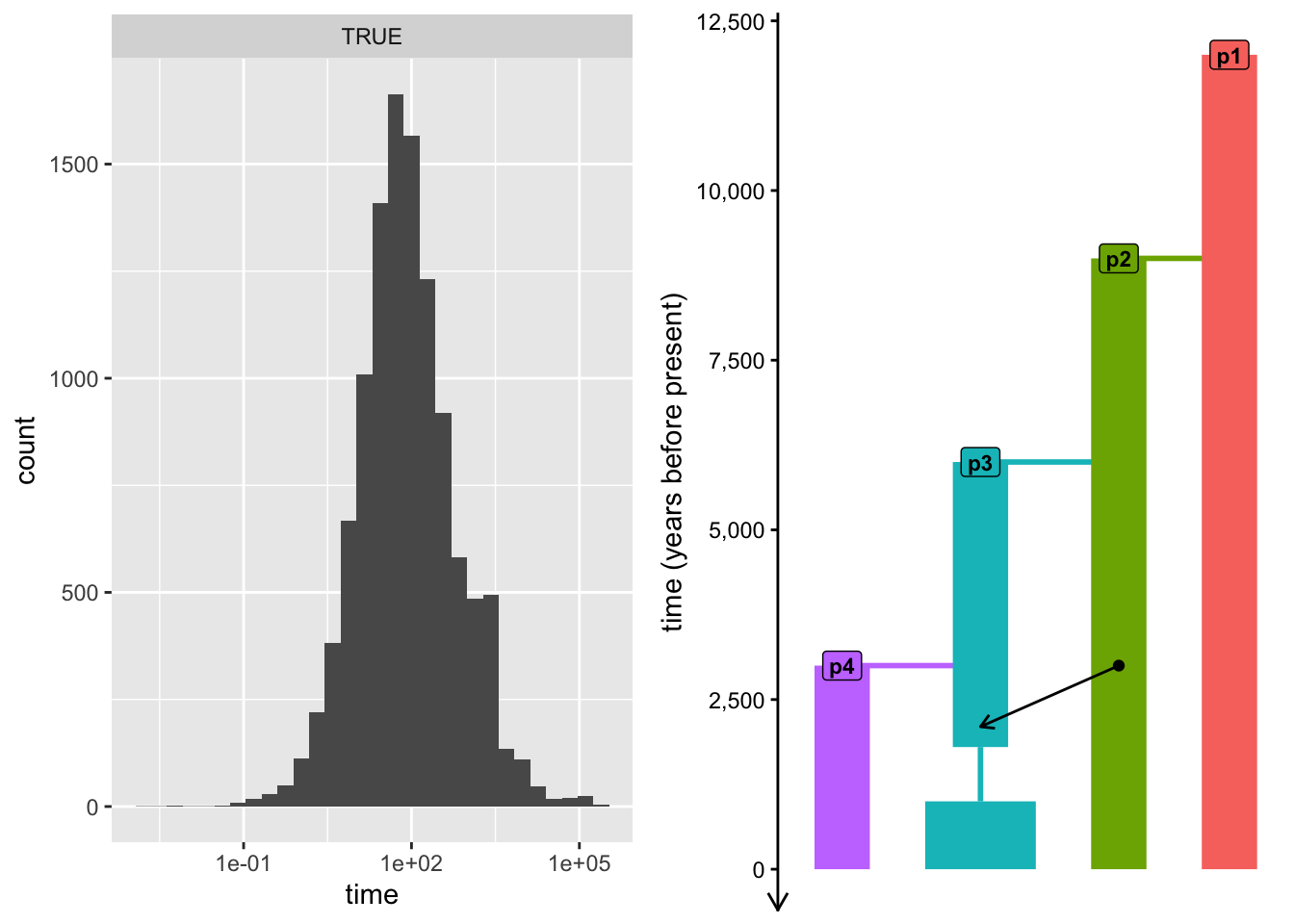
Exercise: Customizing sample recording
We can see that our tree sequence contains a massive number of individuals. Too many, in fact — we recorded every single individual alive at the end of our simulation, which is something we’re unlikely to be ever lucky enough to have, regardless of which species we study.
To get closer to the scale of the genomic data that we usually work with, we can restrict our simulation to only record a subset of individuals—we do this using a process called “scheduling of recorded individuals” implemented by the slendr function schedule_recording(). Simply speaking, this is a functionality of slendr which precisely defines which individuals will be recorded in the tree sequence while ignoring everyone else.
The function follows the structure in the following snippet, representing another very useful pattern worth keeping in mind going forward:
schedule <- schedule_recording(
  <compiled slendr model>,
  times = <times of recording>,
  list(<population object>, <number of samples to record>),
  [... etc. ... ]
)
We then use this schedule object in a standard msprime() function call, setting it as the argument of the same name (schedule =) like this:
ts <- msprime(model, sequence_length = 1e6, recombination_rate = 1e-8, schedule = schedule)To get an idea about what this function does in practice, modify the command which simulates the ts object in your script slendr_scheduling.R according to the snippet above, but include a schedule for recording 5 individuals from each of the four populations. When you re-run the new simulation to get a new ts object and type ts into your console, do you see a change? Again, use your knowledge of ts_recorded() and some dplyr table processing function to inspect the recorded individuals.
Hint: To make this easier to see, maybe keep the original simulation command in your script (the one without the schedule) but modify it to create a variable ts_big instead before you create the new ts object.
Note: In order to make recording of smaller number of individuals from a (potentially huge) number of population easier, schedule_recording() supports a shortcut of list("all", <number>) which records the given number of individuals from every population in the model at the given time.
Exercise: Complex recording schedules
What if we need to simulate different number of individuals from different populations at very specific times? Doing this with a single call to schedule_recording() is not possible. Luckily, multiple schedules can be easily combined together into a single sampling schedule.
Type the schedule variable in your R console. What do you see? Why did I say that multiple schedules can be easily combined? And how could we combine them?
Normally we don’t ever have to look at this data (unless something goes wrong with the sampling and troubleshooting slendr itself is needed), but knowing the format of the schedule means we can easily combine multiple schedules using standard functions such as rbind() (included in base R).
In the following chapters, we will be working on implementing many real-world scenarios from widely established research in population genomics, particularly those from the field ancient DNA field. Naturally, in cases like this, we need to be able to simulate sequences of “ancient” individuals as well as various “present-day” reference panels.
In preparation for these complex exercises, implement the recording schedule summarized into the table below. You will have to figure out how many individual schedules you’ll have to create using schedule_recording(), then bind them together using the function rbind() mentioned above. Then, simulate a tree sequence ts with this new complex schedule, modifying your current solution script accordingly.
| time (years B.P.) | population | samples at each time | interpretation |
|---|---|---|---|
| 0 | p1 | 1 | outgroup |
| 0 | p2 | 1 | admixture source |
| from 5 k B.P., every 1 k years | p3 | 5 | time-series of ancient individuals |
| 0 | p4 | 10 | panel of reference individuals |
Hint: You can provide a vector of numbers as the times = argument of schedule_recording(). See the help page for ?schedule_recording for more information and to see a concrete example.
Exercise: Recording of named individuals
Sometimes, we don’t just want to record a given set of “anonymous” individuals, but we want to be able to work with unique, named individuals. This can be especially helpful when we want to reconstruct a particular scenario in some specific archaeological context (for instance, we want to work with some very precious archaeological sample, such as the “Altai Neanderthal”).
We can do so by calling schedule_recording() in a slightly modified way which doesn’t use the normal syntax list(<population>, <number>), to record a given number of individuals from the given population, but instead uses the format of list(<population>, 1, "<name of the individual>").
Use this format to modify your recording schedule (for instance, based on combining two recording schedules called modern and ancient) to implement a unique recording event which will give the one representative individual of the admixture source population the name "source_ind" and the outgroup individual will be named "outgroup_ind". Then create a new combined schedule again, and verify that you got the newly named individuals in a new simulated tree sequence ts.
You may have noticed that plot_model() has a number of optional arguments. One of them is called schedule and it accepts a sampling schedule (such as the one you just created) as its input. Use your model and sampling schedule to visualize your model.
This functionality can be useful as an additional validation of your modeling scripts, so always remember to use this for sanity checking your simulations (after all, a picture can be worth more than thousand words dozens of lines of code)!
NoteClick to see the solution
Here’s is the model on its own:
plot_model(model)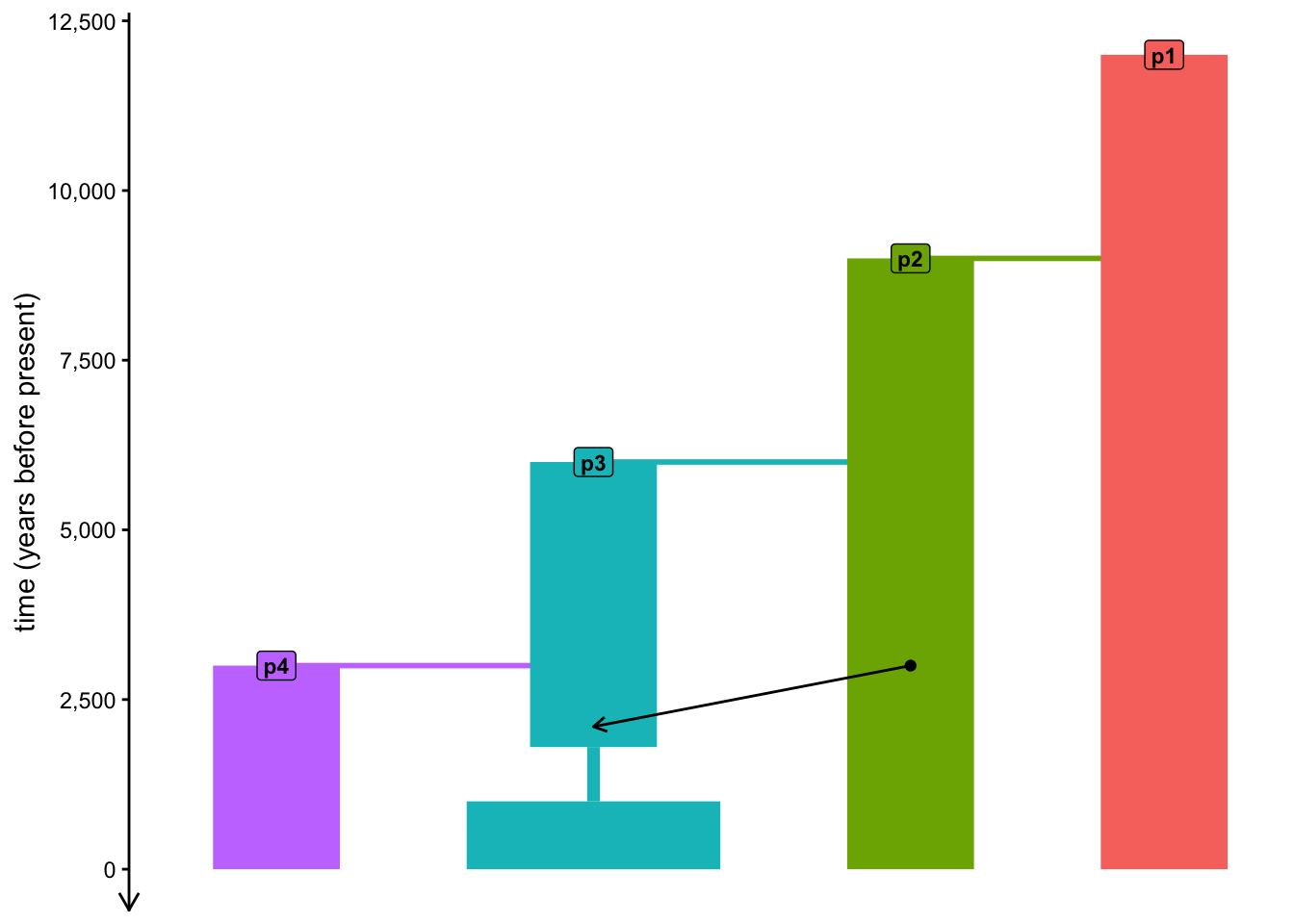
Here is the model with sampling numbers overlaid on top:
plot_model(model, schedule = schedule)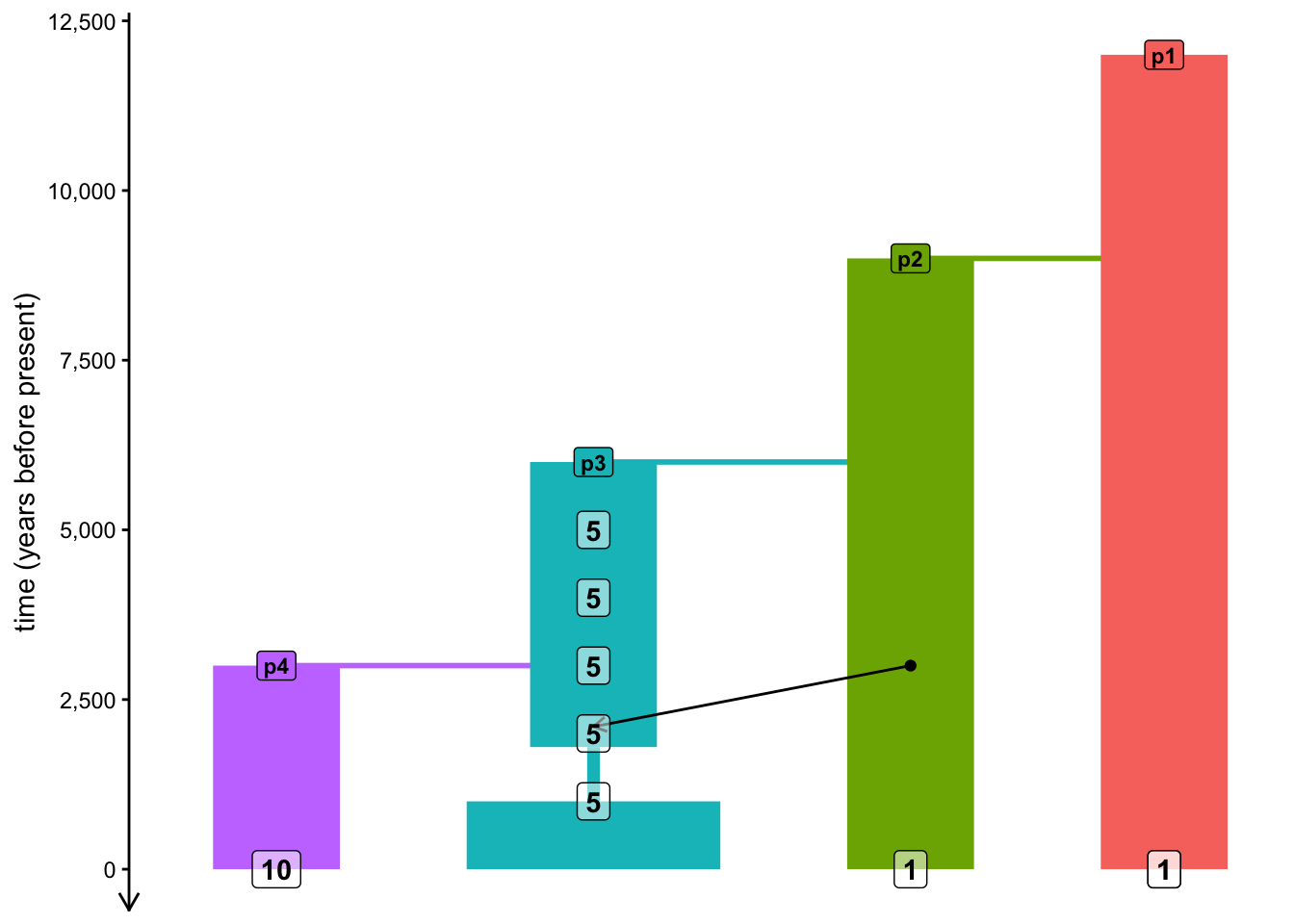
Note: As you’ve seen above, the visualization is often a bit wonky and convoluted with overlapping elements, so don’t be too frustrated if the results of your plot_model() visualizations are not too pretty. The function has been designed as a validation and troubleshooting tool, rather than a tool to create publication-ready figures.
Catch up
If you want to just catch up to the point at which this section would conclude, here is the version of our simulation script at the end of the final exercise:
NoteClick to see the solution
library(slendr)
init_env()
p1 <- population("p1", time = 12000, N = 10000)
p2 <- population("p2", time = 9000, N = 2000, parent = p1)
p3 <- population("p3", time = 6000, N = 5000, parent = p2)
p4 <- population("p4", time = 3000, N = 2000, parent = p3)
gf <- gene_flow(from = p2, to = p3, start = 3000, end = 2100, proportion = 0.1)
model <- compile_model(
populations = list(p1, p2, p3, p4), gene_flow = gf,
generation_time = 30,
time_units = "years before present"
)
outgroup <- schedule_recording(model, times = 0, list(p1, 1, "outgroup_ind"))
source<- schedule_recording(model, times = 0, list(p2, 1, "source_ind"))
modern <- schedule_recording(model, times = 0, list(p1, 1), list(p4, 10))
ancient <- schedule_recording(model, times = seq(5000, 1000, by = -1000), list(p3, 5))

schedule <- rbind(outgroup, source, modern, ancient)
plot_model(model, proportions = TRUE, schedule = schedule)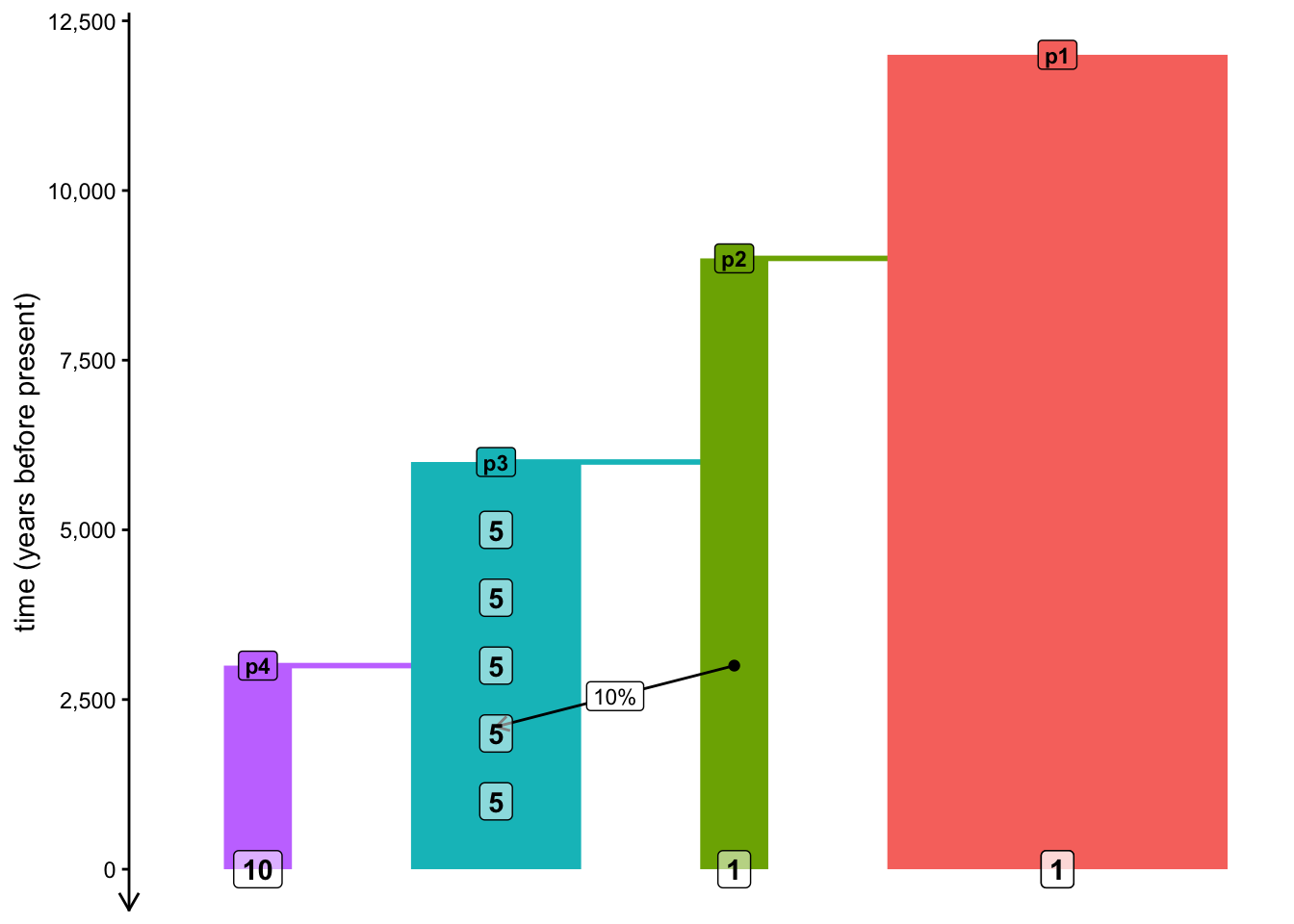
ts <- msprime(model, sequence_length = 1e6, recombination_rate = 1e-8, schedule = schedule)